
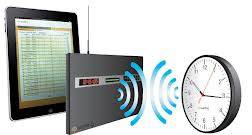
Depending on the size of your facility and how many buildings the company and/or organization occupies, you could have anywhere from 10 to 1,000+ clocks installed throughout. For a facility manager and his/her staff, that could potentially be a lot of clocks to keep an eye on. Not to mention, a whole slew of other equipment to monitor and issues that could arise within a company or organization at any moment.
Sapling has engineered a Wireless Clock System with TalkBack Technology in order to help facility departments easily monitor all the clocks within the system in order to avoid any major issues from occurring. Not only does Sapling’s Wireless TalkBack System provide all the secondary clocks with the most accurate time, this system also allows the secondary clocks to report their status back to the master clock. The secondary clocks can report back the following:
- Current battery levels
- Signal strength
- Mechanical (analog) or display (digital) alerts
- Last time the clock(s) received a signal
The clock system’s administrator can access all this information and so much more through Sapling’s master clock web interface. In order to gain access to the web interface, you must retrieve the IP address of the master clock (this is explained in detail in the master clock’s manual). Once the master clock’s IP address is located, you can type the address into a web browser of a computer that is connected to the same network as the master clock. By logging into the web interface and clicking on the TalkBack tab, there will be a list of every TalkBack Wireless clock within the system. This tab will give you the location of the clock (the clock system’s administrator will choose at the time of installation), and all the information needed to determine the status of the clocks within the system.
Sapling’s Wireless TalkBack System allows the system’s administrator to be in total control of the clock system. There is no need to wonder if the clock system is operating correctly; the facility department will have all the necessary information at their fingertips.
Thanks to Sapling for the article.