Most people start looking into a Spectracom TimeView 400 replacement for one of three reasons: a clock has gone dark, its seconds won’t stop flashing, or someone has just told them spares are hard to find. TimeView 400 displays have hung in dispatch centres, control rooms, broadcast facilities and hospitals since the early 2000s (the original Model 8177 manual dates from 2002), and many of them are now 15 to 25 years old.
Here’s the reassuring part. The master clock driving those displays, usually a Spectracom NetClock or SecureSync, is normally in good shape, and replacing the displays is a well-understood project. (Spectracom is now part of Safran; we covered that transition last year.) It’s still worth checking where your master sits in its own lifecycle; more on that below.
This guide covers a quick check to rule out a simple fault, your realistic replacement options, what each one changes on site, and how to plan the switch without surprises.
First, a quick check: is it the clock or the signal?
Flashing seconds on a TimeView usually mean the display isn’t receiving valid time, not that the display itself has failed. Before replacing anything, check four things:
- The master clock is in sync. Its front panel or web interface should show it locked to its reference. On a NetClock 9483, a TV400W won’t synchronize at all until the master is locked.
- The RS-485 output is still set to Spectracom Format 0 or Format 1. Any other format and the seconds keep flashing.
- Polarity and termination are right. +Data to +Data, −Data to −Data, ground to ground, and a 120-ohm terminator on the last clock in the chain only.
- The clock’s plug-in power supply still delivers its rated 12 volts DC under load. Power supplies age too.
One more: a clock that is off by exactly a whole number of hours is showing UTC or the wrong time zone. That’s a setting on the master, not a failure.
Safran’s RS-485 TimeView troubleshooting note walks through each step. If one of these fixes your clock, good: you’ve bought time to plan the rest.
The good news: your master clock can stay
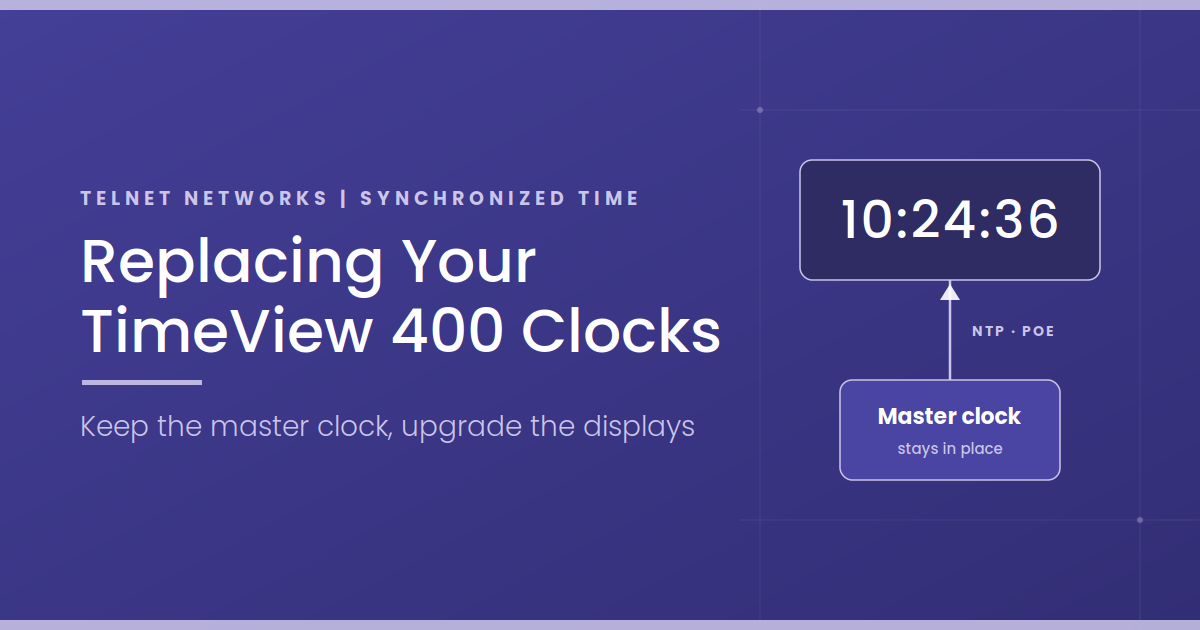
Every option in this guide keeps your existing master clock as the time source. Later NetClock models, such as the 9400 series, and SecureSync units are also network time servers: they serve time over NTP (Network Time Protocol, the standard way devices set their clocks across a network) while still driving the RS-485 serial output that feeds your TimeViews. That means one master clock can feed new network clocks and your remaining TimeViews at the same time, which is what makes a phased replacement possible.
Two caveats are worth knowing up front.
The earliest masters, such as the NetClock/2 (8182), NetClock/GPS (8183) and NetClock/GTP (8183A), predate built-in network time. The 8183A, for example, has no Ethernet port of its own; network time came from a separate add-on unit. If one of these is in your rack, bring the master into the conversation from the start.
The master also has a lifecycle of its own. Safran plans to end-of-life the NetClock 9483 and the SecureSync 1200 series in 2028, as we covered in our end-of-life reminder. That’s not a reason to rush, but if you’re replacing displays in the next year or two, plan the master alongside them. Network clocks will work with its successor, because they take NTP from any standards-based time server. If you want remaining TimeViews to ride through a master upgrade, confirm that the new master’s RS-485 output supports Spectracom Format 0 or 1.
Your TimeView 400 replacement paths
There is no current like-for-like TimeView 400 alternative that drops onto your existing RS-485 chain and speaks its Spectracom format. Safran’s current display range is network-based, and other manufacturers’ wired serial clocks use their own protocols and wiring, so they aren’t a drop-in either. That leaves two realistic ways to get time from your master clock to the wall. Both change something on site, and the next section covers what.
Network clocks: NTP over Power over Ethernet
This is the most common modern path. Each clock plugs into a network switch with a single Cat5e or Cat6 cable that carries both power and time. Power over Ethernet (PoE, the IEEE 802.3af standard) means no outlet is needed at the clock, and the clock takes its time over NTP from the NetClock or SecureSync you already own.
What you gain:
- No plug-in power supply at each clock.
- Time zone and daylight saving time set once, not clock by clock.
- Clocks configured and checked centrally, usually from a browser.
- No daisy chain, so one cable fault affects one clock instead of every clock beyond it.
Sapling’s SBP 3000 series comes with 2.5-inch or 4-inch digits in 4-digit or 6-digit models, with a built-in web interface and automatic daylight saving time. Bodet’s Style range includes NTP/PoE models such as the Style 7, with 7 cm digits, and the Style 7S, which adds seconds. Novanex makes 4-digit and 6-digit PoE clocks, and Safran’s own current displays also synchronize over NTP and PoE. Analog clocks use the same sync methods if a room calls for them. (More on the general case in the advantages of IP and PoE clocks.)
Wireless clocks
For buildings where pulling new cable is hard or expensive, such as heritage buildings, large campuses, or long runs between buildings, wireless is the alternative. A wireless master or transmitter takes time from your existing time server over NTP and broadcasts it to the clocks. Sapling’s system, for example, uses licence-free 900 MHz frequency-hopping radio in a mesh, where each clock also repeats the signal to its neighbours.
Be clear-eyed about two things. Wireless adds a layer: the transmitter is one more device to power, place and maintain. And the clocks still need power, either batteries or a nearby outlet depending on the model. Some clocks join your existing Wi-Fi instead, which removes the transmitter but brings IT back into the project.
What’s different, and how to plan for it
Your TimeView system was simple: one cable from the master through a chain of clocks, a plug-in power supply at each clock, and the time zone set centrally or with switches. Every replacement path changes at least one of those things. None of them is a problem if you plan for it.
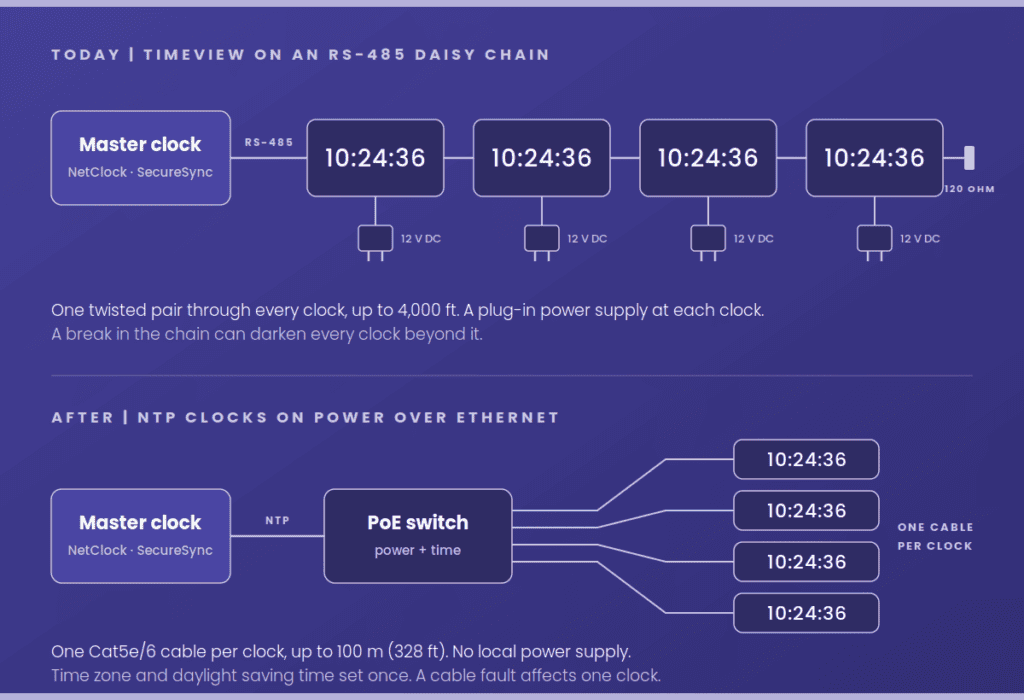
Cabling. An RS-485 chain can run up to 4,000 feet. An Ethernet run is generally limited to 100 metres (328 feet) from the switch, and each clock gets its own run instead of sharing a chain. The twisted pair that feeds your TimeViews can’t carry Ethernet, so plan for new Cat5e or Cat6 drops, or a PoE switch closer to where the clocks hang. The existing pathway is often reusable even when the cable isn’t.
Power. Say goodbye to wall-warts. In their place, confirm the switch has enough PoE ports and enough power budget. PoE clocks are modest loads: Sapling rates its SBP 3000 series at 6 to 8.4 watts depending on the model, comfortably within what an 802.3af port supplies.
Who’s involved. Network clocks put your IT team in the project. That usually means a VLAN or port assignment, DHCP or static IP addresses, and allowing NTP (UDP port 123) from the master to the clocks. Bring IT in on day one and it’s a routine request; bring them in the week of installation and it becomes a delay.
Configuration. DIP switches and serial format settings give way to a browser page, or to settings the clocks pick up automatically from the network. Time zone and daylight saving time are set once, which also retires the familiar “the clocks are an hour off after the time change” problem.
What the clock looks like. The TimeView 400 had green digits: 4-inch hours and minutes, and 2.3-inch seconds. Many current models ship with red digits by default, but Sapling, Bodet and Novanex all offer green, so specify it if your room is used to green. If seconds matter, as they do in dispatch, broadcast and control rooms, specify a 6-digit model. Then check digit height against your longest viewing distance. The TimeView 400 was rated for 150 feet (45m); Sapling rates its 4-inch digits at 250 feet (76m), and Bodet rates the Style 7 at 131ft (40m).
Failure behaviour. Everyone in your room knows what flashing TimeView seconds mean. The new clocks will signal “no sync” differently, and the conventions vary by brand. Sapling’s clocks flash the colon when they lose sync. On Bodet’s NTP clocks it works the other way round: after 48 hours without sync, the clock can be set either to go blank or to keep running on its internal time base with the colon no longer flashing. Novanex clocks show dashes and light a service indicator when they can’t reach the time server. Pick the behaviour deliberately and tell your staff what it looks like. Some PoE clocks can also report a lost sync to a monitoring system, so you aren’t relying on someone to spot it.
Phasing and mixed fleets. Phased replacement works because your master keeps driving the remaining TimeViews over RS-485 while the new clocks take NTP. Two things keep it tidy. First, replace room by room, not clock by clock: two digit colours or styles in one room looks odd and invites “which one is right?” questions. Second, when you take a TimeView out of the chain, splice the pair through so the clocks beyond it keep their signal, move the 120-ohm terminator if you’ve removed the last clock, and check whether the clock you’re removing was acting as a repeater for a long run.
Accuracy. For a wall display, NTP from your own master clock is more than accurate enough: far closer to true time than the one second a display can show.
A simple way to choose
| Your situation | Likely path |
|---|---|
| A room or building refresh, with network drops available or easy to add | Network clocks (NTP/PoE) |
| A few failed clocks, the rest healthy | Network clocks for the affected room; the rest of the chain stays on RS-485 until its turn |
| New cable is hard or expensive to pull | Wireless clocks |
| Master is a pre-network model, or a NetClock 9483 or SecureSync 1200 | Review the master at the same time as the displays |
If more than one row applies, that’s normal; many sites combine them in phases.
What to have ready before you call
A short look at what’s installed, and where, turns all of this into a straightforward decision. Gather these first and you’ll get a faster, more useful answer:
- Master clock model and firmware version (from the front panel or web interface)
- Number of TimeView clocks, where they are, and how many have failed
- Rough cable routes and lengths, and whether the chain uses a repeater
- Whether you need seconds, the date, or a specific digit colour or size
- Whether there are network switches with PoE near the clock locations, and who owns them
- Whether the clocks show local time or UTC, and any multi-time-zone displays
- Any regulatory or operational requirements, such as dispatch or broadcast logging standards
Get a clock replacement check
Telnet’s clock replacement check reviews your master clock, confirms what it can feed, and recommends a path for your displays, room by room if that suits you.
Prefer to start smaller? Send us your master clock model and how many TimeViews you have, and we’ll come back with a quick compatibility check and a replacement recommendation.
Telnet Networks is a Canadian value-added reseller of synchronized time, network visibility, and test and measurement solutions. We work with Safran, Sapling, Bodet and Novanex, and our recommendations depend on the site in front of us. Spectracom, TimeView, NetClock and SecureSync are trademarks of their respective owners and are used here only to identify compatible equipment.