
Replacing Your Spectracom TimeView 400 Clocks: Options, Differences and How to Plan the Switch

log header for Spectracom TimeView 400 replacement: a digital wall clock fed over NTP and PoE from a master clock that stays in place.

Most people start looking into a Spectracom TimeView 400 replacement for one of three reasons: a clock has gone dark, its seconds won’t stop flashing, or someone has just told them spares are hard to find. TimeView 400 displays have hung in dispatch centres, control rooms, broadcast facilities and hospitals since the early 2000s (the original Model 8177 manual dates from 2002), and many of them are now 15 to 25 years old.

Here’s the reassuring part. The master clock driving those displays, usually a Spectracom NetClock or SecureSync, is normally in good shape, and replacing the displays is a well-understood project. (Spectracom is now part of Safran; we covered that transition last year.) It’s still worth checking where your master sits in its own lifecycle; more on that below.

This guide covers a quick check to rule out a simple fault, your realistic replacement options, what each one changes on site, and how to plan the switch without surprises.

First, a quick check: is it the clock or the signal?

Flashing seconds on a TimeView usually mean the display isn’t receiving valid time, not that the display itself has failed. Before replacing anything, check four things:

  1. The master clock is in sync. Its front panel or web interface should show it locked to its reference. On a NetClock 9483, a TV400W won’t synchronize at all until the master is locked.
  2. The RS-485 output is still set to Spectracom Format 0 or Format 1. Any other format and the seconds keep flashing.
  3. Polarity and termination are right. +Data to +Data, −Data to −Data, ground to ground, and a 120-ohm terminator on the last clock in the chain only.
  4. The clock’s plug-in power supply still delivers its rated 12 volts DC under load. Power supplies age too.

One more: a clock that is off by exactly a whole number of hours is showing UTC or the wrong time zone. That’s a setting on the master, not a failure.

Safran’s RS-485 TimeView troubleshooting note walks through each step. If one of these fixes your clock, good: you’ve bought time to plan the rest.

The good news: your master clock can stay

Every option in this guide keeps your existing master clock as the time source. Later NetClock models, such as the 9400 series, and SecureSync units are also network time servers: they serve time over NTP (Network Time Protocol, the standard way devices set their clocks across a network) while still driving the RS-485 serial output that feeds your TimeViews. That means one master clock can feed new network clocks and your remaining TimeViews at the same time, which is what makes a phased replacement possible.

Two caveats are worth knowing up front.

The earliest masters, such as the NetClock/2 (8182), NetClock/GPS (8183) and NetClock/GTP (8183A), predate built-in network time. The 8183A, for example, has no Ethernet port of its own; network time came from a separate add-on unit. If one of these is in your rack, bring the master into the conversation from the start.

The master also has a lifecycle of its own. Safran plans to end-of-life the NetClock 9483 and the SecureSync 1200 series in 2028, as we covered in our end-of-life reminder. That’s not a reason to rush, but if you’re replacing displays in the next year or two, plan the master alongside them. Network clocks will work with its successor, because they take NTP from any standards-based time server. If you want remaining TimeViews to ride through a master upgrade, confirm that the new master’s RS-485 output supports Spectracom Format 0 or 1.

Your TimeView 400 replacement paths

There is no current like-for-like TimeView 400 alternative that drops onto your existing RS-485 chain and speaks its Spectracom format. Safran’s current display range is network-based, and other manufacturers’ wired serial clocks use their own protocols and wiring, so they aren’t a drop-in either. That leaves two realistic ways to get time from your master clock to the wall. Both change something on site, and the next section covers what.

Network clocks: NTP over Power over Ethernet

This is the most common modern path. Each clock plugs into a network switch with a single Cat5e or Cat6 cable that carries both power and time. Power over Ethernet (PoE, the IEEE 802.3af standard) means no outlet is needed at the clock, and the clock takes its time over NTP from the NetClock or SecureSync you already own.

What you gain:

  • No plug-in power supply at each clock.
  • Time zone and daylight saving time set once, not clock by clock.
  • Clocks configured and checked centrally, usually from a browser.
  • No daisy chain, so one cable fault affects one clock instead of every clock beyond it.

Sapling’s SBP 3000 series comes with 2.5-inch or 4-inch digits in 4-digit or 6-digit models, with a built-in web interface and automatic daylight saving time. Bodet’s Style range includes NTP/PoE models such as the Style 7, with 7 cm digits, and the Style 7S, which adds seconds. Novanex makes 4-digit and 6-digit PoE clocks, and Safran’s own current displays also synchronize over NTP and PoE. Analog clocks use the same sync methods if a room calls for them. (More on the general case in the advantages of IP and PoE clocks.)

Wireless clocks

For buildings where pulling new cable is hard or expensive, such as heritage buildings, large campuses, or long runs between buildings, wireless is the alternative. A wireless master or transmitter takes time from your existing time server over NTP and broadcasts it to the clocks. Sapling’s system, for example, uses licence-free 900 MHz frequency-hopping radio in a mesh, where each clock also repeats the signal to its neighbours.

Be clear-eyed about two things. Wireless adds a layer: the transmitter is one more device to power, place and maintain. And the clocks still need power, either batteries or a nearby outlet depending on the model. Some clocks join your existing Wi-Fi instead, which removes the transmitter but brings IT back into the project.

What’s different, and how to plan for it

Your TimeView system was simple: one cable from the master through a chain of clocks, a plug-in power supply at each clock, and the time zone set centrally or with switches. Every replacement path changes at least one of those things. None of them is a problem if you plan for it.
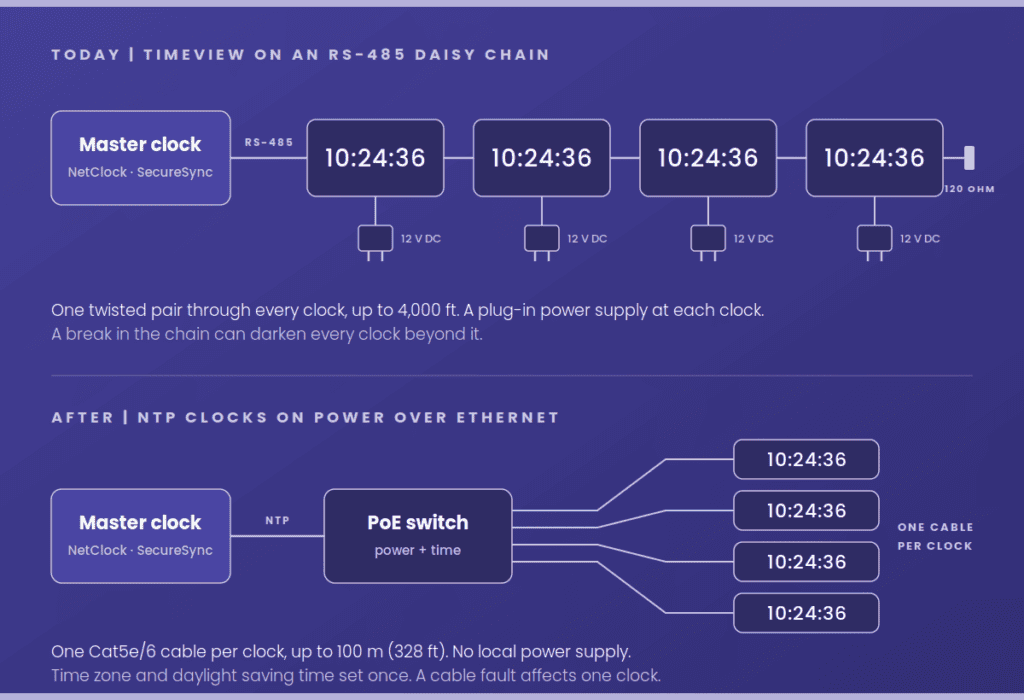
Diagram comparing a TimeView RS-485 daisy chain, with a power supply at each clock, to NTP clocks powered from a PoE network switch, both fed by the same master clock.

Cabling. An RS-485 chain can run up to 4,000 feet. An Ethernet run is generally limited to 100 metres (328 feet) from the switch, and each clock gets its own run instead of sharing a chain. The twisted pair that feeds your TimeViews can’t carry Ethernet, so plan for new Cat5e or Cat6 drops, or a PoE switch closer to where the clocks hang. The existing pathway is often reusable even when the cable isn’t.

Power. Say goodbye to wall-warts. In their place, confirm the switch has enough PoE ports and enough power budget. PoE clocks are modest loads: Sapling rates its SBP 3000 series at 6 to 8.4 watts depending on the model, comfortably within what an 802.3af port supplies.

Who’s involved. Network clocks put your IT team in the project. That usually means a VLAN or port assignment, DHCP or static IP addresses, and allowing NTP (UDP port 123) from the master to the clocks. Bring IT in on day one and it’s a routine request; bring them in the week of installation and it becomes a delay.

Configuration. DIP switches and serial format settings give way to a browser page, or to settings the clocks pick up automatically from the network. Time zone and daylight saving time are set once, which also retires the familiar “the clocks are an hour off after the time change” problem.

What the clock looks like. The TimeView 400 had green digits: 4-inch hours and minutes, and 2.3-inch seconds. Many current models ship with red digits by default, but Sapling, Bodet and Novanex all offer green, so specify it if your room is used to green. If seconds matter, as they do in dispatch, broadcast and control rooms, specify a 6-digit model. Then check digit height against your longest viewing distance. The TimeView 400 was rated for 150 feet (45m); Sapling rates its 4-inch digits at 250 feet (76m), and Bodet rates the Style 7 at 131ft (40m).

Failure behaviour. Everyone in your room knows what flashing TimeView seconds mean. The new clocks will signal “no sync” differently, and the conventions vary by brand. Sapling’s clocks flash the colon when they lose sync. On Bodet’s NTP clocks it works the other way round: after 48 hours without sync, the clock can be set either to go blank or to keep running on its internal time base with the colon no longer flashing. Novanex clocks show dashes and light a service indicator when they can’t reach the time server. Pick the behaviour deliberately and tell your staff what it looks like. Some PoE clocks can also report a lost sync to a monitoring system, so you aren’t relying on someone to spot it.

Phasing and mixed fleets. Phased replacement works because your master keeps driving the remaining TimeViews over RS-485 while the new clocks take NTP. Two things keep it tidy. First, replace room by room, not clock by clock: two digit colours or styles in one room looks odd and invites “which one is right?” questions. Second, when you take a TimeView out of the chain, splice the pair through so the clocks beyond it keep their signal, move the 120-ohm terminator if you’ve removed the last clock, and check whether the clock you’re removing was acting as a repeater for a long run.

Accuracy. For a wall display, NTP from your own master clock is more than accurate enough: far closer to true time than the one second a display can show.

A simple way to choose

Your situationLikely path
A room or building refresh, with network drops available or easy to addNetwork clocks (NTP/PoE)
A few failed clocks, the rest healthyNetwork clocks for the affected room; the rest of the chain stays on RS-485 until its turn
New cable is hard or expensive to pullWireless clocks
Master is a pre-network model, or a NetClock 9483 or SecureSync 1200Review the master at the same time as the displays

If more than one row applies, that’s normal; many sites combine them in phases.

What to have ready before you call

A short look at what’s installed, and where, turns all of this into a straightforward decision. Gather these first and you’ll get a faster, more useful answer:

  1. Master clock model and firmware version (from the front panel or web interface)
  2. Number of TimeView clocks, where they are, and how many have failed
  3. Rough cable routes and lengths, and whether the chain uses a repeater
  4. Whether you need seconds, the date, or a specific digit colour or size
  5. Whether there are network switches with PoE near the clock locations, and who owns them
  6. Whether the clocks show local time or UTC, and any multi-time-zone displays
  7. Any regulatory or operational requirements, such as dispatch or broadcast logging standards

Get a clock replacement check

Telnet’s clock replacement check reviews your master clock, confirms what it can feed, and recommends a path for your displays, room by room if that suits you.

Prefer to start smaller? Send us your master clock model and how many TimeViews you have, and we’ll come back with a quick compatibility check and a replacement recommendation.


Telnet Networks is a Canadian value-added reseller of synchronized time, network visibility, and test and measurement solutions. We work with Safran, Sapling, Bodet and Novanex, and our recommendations depend on the site in front of us. Spectracom, TimeView, NetClock and SecureSync are trademarks of their respective owners and are used here only to identify compatible equipment.

Customization Nation with Sapling Digital Clocks

No matter the product, everyone has different tastes and styles they prefer. Because of this, people really enjoy the ability to customize the items they purchase to meet these preferences. Giving customers the option to personalize their product or service has benefited many different companies in many different industries.

Let’s take the shoe industry as an example. Nike has been wildly successful with the Nikeid option on their website. This option gives their patron the option to customize any type of shoe they want with any combination of colors. The car industry has also jumped on the customization bandwagon. Almost every major car company has an option on their website for their customers to customize the make, model, color, accessories and so much more.

The Sapling Company understands the importance of customization and as the manufacturer of synchronized time systems; Sapling has an array of options to satisfy the broadest of needs. We offer four different synchronized time system options, including: Wired, Wireless, Talkback, and IP. These systems include a master clock at the center of the network and multiple secondary clocks that display the accurate time. The master clock is updated with the accurate time from NTP of GPA, and then sends a signal to the secondary clocks. More specifically within a wireless clock system, the secondary clocks both receive and transmit the signal, until all of the clocks are properly updated.

Within the four systems is the option of what type of clock you would want: analog or digital. If you chose the round analog clocks, then you would get the option of the 12” or 16”clock. Sapling also offers a 9” or 12” square clock for more variety within the analog family. Both the round and square clocks have the additional options of customizable hands and dials!

If you chose the digital clocks, then you would be hit with the brand new color customization display options. While red is the standard color option, you will now have the choice between green, white, amber and blue.

Thanks to Sapling for the article.

The Benefits of Using 2-Wire Digital Master Clock System

If you are considering a wired clock system for your facility, the 2-wired Digital Master Clock System option with Sapling may be the best option for you. Take a look at the unique advantages of this system below. In addition to the written description, check out our video at the bottom to see a visual depiction of how the 2-Wire Digital Clock System works.

Power/Data on the Same Line

Most wired clock systems require three or four wires. With Sapling’s 2-Wire Digital Communication System, the converter box supplies the power and amplifies the data, so that power and data are integrated on the same line. Fewer wires mean a cleaner, less cumbersome and more efficient system.

Instant Correction

As with all of Sapling’s clock systems, our goal is to provide synchronized, accurate time to keep your education, healthcare or business facility operating at its best. The 2-Wire Digital Communication System provides time updates to all of the clocks as often as once per second. With such frequent corrections, your clocks are guaranteed to show the accurate time, all the time. Another auto correction feature is the 5 minute synchronization after a power outage. If power is lost, you won’t have to worry about resetting the clocks or waiting a few hours for them to be re-synchronized. Within five minutes of getting power back, the master clock will send a signal to reset all of the clocks to the accurate time. Even if a power outage causes some temporary chaos in other areas, clock malfunctions or time inaccuracies will not be issues to add to the mix. Sapling takes care of that part for you.

Effortless Installation

The installation of the 2-Wired System is simple and straightforward for a few reasons. First, the low voltage requirement means that you do not need a certified electrician to install the system in most countries. Having two wires going from the master clock to each individual clock instead of four also makes setup quicker and easier. Even if a mistake is made with the two wires, our cutting-edge reverse polarity detection technology will recognize the error and autocorrect it. What could be easier than that?

Hopefully, the only thing easier is making the decision to install Sapling’s 2-Wire Digital Master Clock System for its advanced technological capabilities, ease, accuracy and the superior quality and service that you can expect from Sapling.

Thanks to Sapling for the article.

Sapling’s Master Clock – Leader of the Pack – Part 2

In continuing with our post explaining how Sapling’s master clocks can receive time, the second option a user has to receive time is through a GPS Receiver.

Receiving time from a GPS satellite is not only extremely accurate, it is also very secure. With the GPS Receiver, the facility does not have to go outside the facility’s established firewall and use a time source via the Internet.

A GPS receiver is built-in to the master clock and sends out the master clock’s exact location to satellites around the world. From the satellite, the master clock receives the accurate UTC (Coordinated Universal Time), then corrects to the local time based on the user’s location.

The GPS Receiver option can be used in conjunction with the NTP Server option, which you can learn about here. A user has the ability to choose which option will be the main time source and which will be the backup time source. By utilizing both options, a user will have redundancy within their system, ensuring accuracy. Receiving time via GPS is optional with a Sapling’s master clock.

Stay tuned next week for the third way Sapling’s master clocks can receive time! If you are interested in learning more about our master clocks in the meantime, visit our website for more info or check out our YouTube video explaining our master clocks more in depth.

Thanks to Sapling for the article.

Unique Features of Sapling’s IP Clock System

Sapling’s IP Clock System is unlike your typical clock system. This synchronized clock system is powered by (PoE) or Power-over-Ethernet, receiving power and data through a CAT5 cable, there is no need for an additional outlet. This system allows for easy set up and operation for any user and has a number of unique features that make it stand out among the rest.

One such feature is that each clock has its own built-in web interface. The web interface allows a user to adjust many different settings or enable certain features on the clock. For example, a user can choose to set the time to display in 12 or 24 hour mode (digital clocks only), automatically update for Daylight Saving Time, both domestically and internationally and even give that particular clock a name, for example its location in a facility.

Features such as the brightness option can help companies and organizations become more energy efficient. For example, if you work in a school, it’s not a 24/7 operation. A school’s peak hours are typically between 7 a.m and 5 p.m., that’s a ten hour time frame in which the school building has a constant flow of traffic, with dozens of eye balls gazing at the clocks at one point or another. In those peak hours, the brightness is typically set to the high setting for maximum visibility. After school lets out for the day, the clocks aren’t being viewed as much. To conserve energy and money, Sapling gives a user the ability to adjust the brightness to medium, low or off (digital clocks only) after peak hours. This helps a school or any other type of facility save money over the life of the clock system. A user can also establish a brightness schedule for all the digital clocks within a facility.

Another feature that the IP clock system has is the ability to send email alerts on any changes or disruptions that occur. The email notification is sent right to the operator of the clock system if any power failures, major time changes, NTP/SNTP server synchronization issues, display faults or mechanical failures happen.

Sapling prides itself on being the forefront of technology, and our IP clock system, with its web interface allows custom ability of many settings (Brightness Settings, automatic Daylight Saving Time updates, email alerts, etc.) to help your company propel into the future. For more information, do not hesitate to contact us today!

Thanks to Sapling for the article.

Ready, Set, Go! Time Synchronization with Sapling Clocks

For high school students, the short break in between classes is no relaxing matter. They have only a few minutes to get from one classroom to the next. If a student needs to pick up their books for the next class and must stop at their locker, this makes the trip even more challenging. Those few minutes in between classes can get hectic with hundreds of students flooding the hallways sharing the common goal of reaching their next destination on time. Most students are even unaware of how much time they have to reach their next class due to the discrepancy between the times their watch or cell phones display and the time the school clocks display.

A synchronized time keeping system can make the trip between classes more efficient for both teachers and students. If the time displayed on the school’s clocks is extremely accurate, then this time discrepancy will have less of an impact of a high school’s overall schedule. Upon eliminating this time dissimilarity, the amount of students late for class can go down and the overall amount of students who are penalized for nocuous activity can go down as well.

Sapling’s master clock can receive accurate time from any NTP server or GPS satellite. Another feature that Sapling’s master clock comes with is the ability to display a countdown in between classes for the roaming students. While the classes of a high school are switching, the time on the clocks will display a countdown on the display instead of the time. This will let student know exactly how long they have to get from one class to another.

Punctual students make it easier for the teachers of the high school to get through their entire lesson plan. They can start their lessons without being interrupted and they do not have to punish the student(s) for being late. With the assistance of The Sapling Company and the addition of their synchronized clock systems, both teachers and students will have a less hectic day.

Thanks to Sapling Clocks for the article.

Manufacturing Made Easy with Saplings Synchronized Clock Systems

The production department in any company typically runs hand in hand with the company’s overall success. If the manufactures cannot produce goods fast enough then the company’s customer satisfaction will plummet if demand is not met in a timely fashion. The speed in which these manufacturers can produce a product relies heavily on their time management skills. If a manufacturer is not efficient in his or her time management then they will simply fall behind schedule. Emerging technologies has provided new growth for the efficiency of manufacturing plants. With the help of a synchronized time keeping system, a manufacturing plant can become more efficient than ever.

A hold up in production is a recurring problem faced by manufacturers today. A bottleneck in the line can backup each subdivision of the plant. This can be detrimental to the quota that must be met for any particular day. In order to help avoid backup during production and missed quotas, a synchronized time keeping system should be installed. These integrated time keeping systems will help ensure that each stage of production is on time, and every part of the operation is moving forward as desired.

The Sapling Company specializes in synchronized clock systems. The synchronization of time and the ability to easily manage the time system can be an enormous benefactor to any manufacturing plant. Even though these production plants are usually in big warehouses, Sapling’s synchronized wireless clock system can be easily installed to accommodate a building of any size or number of floors.

Within a Sapling wireless system, a master clock is first installed into the establishment. After configuring the master clock to your desired settings, it will send the time signal to the clocks in the plant. The clocks each contain a built-in repeater which allows them to receive the signal and then repeat it to neighboring clocks. This feature permits the master clock to be less expensive than our competitors whose clocks need a lot more power to reach all of the clocks within a facility.

Sapling’s wireless clock system can assist a production manager record the time the spent on assembly by employees and an accurate read of when products are going to be shipped. This is essential when management is deciding where and when to allocate their resources. Sapling prides itself on the reliability and innovation of its synchronized clock systems. In regards to questions or any additional information, please visit our website or contact us.

Thanks to Sapling for the article.

Timing Behind the Scenes – Hospital Transportation Department

Hospital examination rooms, the ER and the various operating rooms are always filled with patients looking to recover from their ailments or diseases, recovering all the way to full health. Hospitals and their employees provide the place and care for these patients to become full operational people. The need to go to several different areas of the hospital facility throughout the day, to get examined or x-rays performed, is necessary in order to heal the ailments. Most of these patients, however, won’t be able to maneuver from certain areas of the hospital to others. They need assistance to get around; this is where the hospital’s transportation department comes into play.

As you know, a hospital’s employees are pivotal to the daily operations of a hospital. Doctors and nurses are involved with performing surgeries, administering medications and prescription drugs, or providing the best overall care to patients that they can. These are obviously large responsibilities, but they couldn’t be done without the help of dozens of other employees behind the scenes. The transportation crew is definitely one of these outstanding resources. These people use wheel chairs, push gurneys or movable beds to pound the tile floor for miles a shift, transporting the patients to where they need to be on time.

Furthermore, their personal interaction with these patients cannot be understated. Many times, providing a comforting hand helps eases the stress and nerves contained by the patient. This will also benefit the doctors and nurses, making their job a little bit easier.

Something that makes every hospital employee’s jobs a bit better is a Sapling synchronized clock system. Providing the most accurate time that’s in sync with every other room in the hospital is quite beneficial: medicine can be administered at the proper time, accurate record keeping can occur and the hospital transportation crew will limit, if not eliminate miscommunication, and always bring the patient to the room they need to be in at the correct time.

Thanks to Sapling for the article.

Sapling Introduces New Slim Line Analog Clocks!

Sapling Introduces New Slim Line Analog Clocks!

As a part of our commitment to innovation, Sapling is proud to introduce our new Slim Line Analog Clocks featuring a lower profile, ABS case. The Slim Line Analog Clocks are offered with a black case, a brushed aluminum finish, or a wooden case and are available with all four (IP, Wired, Wireless, and TalkBack) Sapling synchronized clock systems!

Highlights of the new Slim Line Analog Clocks include:

  • More case options!
  • Solid Wood Case with Cherry Finish
  • Brushed Aluminum Finish
  • New and easier wall mount installation
  • Available in 9″, 12″ and 16″ diameter
  • Black Slim Line Analog Clock and Brushed Aluminum Slim Line Analog Clock can be used with the new Sapling Time Zone Clock
  • Shatterproof polycarbonate crystal with flatter front design
  • Stylish dial and hands options

Sapling’s Slim Line Analog Clocks are expected to be available by the fourth quarter of 2015.

Thanks to Sapling for the article.

The Balancing Act: Transportation

The Balancing Act Series has returned for yet another exciting installment. This week’s endeavor will show us how Sapling’s TalkBack clock system can help airport professionals in the transportation industry better balance their daily tasks.

An airport manager has a multitude of daily tasks that can be made easier with a system from Sapling. An airport manager’s daily tasks can include overseeing and supervising staff, overseeing fueling operations, managing business development and much more. Worrying about whether or not the clocks are ticking throughout the airport terminals is something that a manager shouldn’t have to worry about. With the assistance of a wireless clock system with TalkBack Technology, worrying about the clocks is a thing of the past.

A TalkBack System operates almost exactly as a wireless clock system does, but with one major difference. Within a wireless clock system, the clocks usually receive the time from the master clock (and surrounding clocks because of the built-in repeaters) and correct to the accurate time. Within a TalkBack system, the clocks are able to receive time the same way, but are also able to communicate their status back to the master clock.

An airport manager can easily monitor all the clocks in an airport and head off any major issues. For example, the manager can sign on to the master clock’s web interface and pull up a report that can show each TalkBack clock, the signal strength, battery status and the mechanical status of the clocks.

We understand that an airport manager is busy and pulling up a report on a regular basis may not be on the to-do list. With Sapling’s TalkBack System, the clock’s administrator can receive email alerts directly to their inbox when a clock is missing or a status report hasn’t been received, if a hand failure occurs on an analog clock or a display failure occurs on a digital clock, or if a clock battery is low (analog clocks only).

With Sapling’s TalkBack system, we want to give you peace of mind knowing that your clocks are operating with the upmost efficiency.

Thanks to Sapling for the article.