Understanding Keysight Threat Simulator & Adding Value in the First 24 Hours

In 2026, assuming your network is secure because you bought the “best” tools is no longer a viable strategy. The attack surface has mutated rapidly; identity is the new perimeter, and AI-driven threats can execute in minutes.

The real challenge isn’t acquiring security controls (Firewalls, EDR, SIEM); it’s verifying that they are configured correctly and operating effectively. This concept—constantly testing your defenses against real-world adversarial behavior—is called Breach and Attack Simulation (BAS).

Today, we are diving deep into one of the industry’s premier BAS platforms: Keysight Threat Simulator, and outlining how you can extract measurable value from the platform in your very first day of deployment.

The Core of the Matter: What is Keysight Threat Simulator?

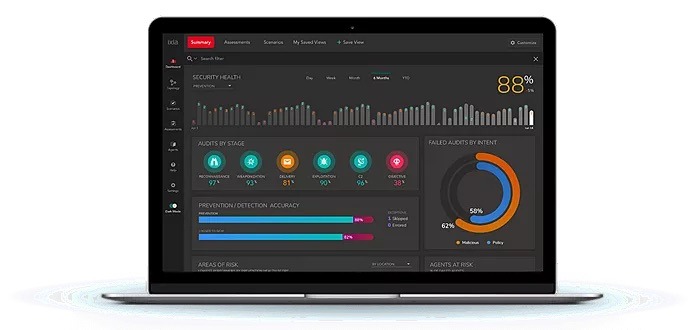
Keysight Threat Simulator is a safe, scalable, and continuous Breach and Attack Simulation platform. Its primary purpose is to eliminate security assumptions by proactively validating your entire security stack against a library of thousands of simulated attacks.

Unlike a static penetration test that provides a snapshot in time, Threat Simulator provides continuous visibility. It uses software agents (probes) deployed safely in your production environment—behind your firewalls, on endpoints, and in the cloud. These agents communicate with each other and Keysight’s “Dark Cloud” to emulate complete attack chains, without using real malware or compromising actual user data.

By running these controlled simulations, you achieve three critical goals:

  1. Identify Misconfigurations: Discover where a firewall rule drift or an outdated EDR policy is failing to block known threats.
  2. Validate Logging & Alerting: Ensure that when a control does block an attack, your SIEM actually receives the alert. Many organizations have blocking power but are functionally blind.
  3. Prioritize Remediation: Stop guessing what to fix first. Threat Simulator prioritizes gaps based on real-world risk and provides specific, vendor-agnostic remediation steps (like Snort rules or policy changes).

Adding Value in the First 24 Hours: A Phase-by-Phase Guide

The biggest mistake new BAS users make is trying to test everything at once. This leads to alert fatigue and data overload. The goal for your first 24 hours is foundational validation: ensure the agents are deployed, integrated, and that basic security communication is happening.

Here is your Day 1 playbook:

Phase 1: The Baseline (Hours 1–4)

Objective: Verify that the infrastructure is ready and your controls can execute fundamental blocking.

  1. Deployment: Deploy at least two agents: one in a “Protected” zone (trusted internal network) and one “Unprotected” (DMZ or outside).
  2. The “Sanity Check” Audit: Run a simple, low-risk audit, such as a clear-text transfer of the EICAR test file over HTTP.
  3. The Question: Did my perimeter firewall/IPS block the download? In the Threat Simulator dashboard, this test must show as “Blocked.” This confirms the fundamental blocking loop is intact.

Phase 2: The Visibility Audit (Hours 5–12)

Objective: Test your detection logic and logging pipeline. Does your SOC actually see the attack?

  1. Integrate Your SIEM/EDR: Connect Threat Simulator to your central logging platform (Sentinel, Splunk, CrowdStrike, etc.) via API.
  2. The Lateral Movement Test: Simulate a common internal technique, like an SMB brute-force or internal port scan, between your two agents.
  3. The Analysis: This is the most critical check. Ignore the Threat Simulator dashboard for a moment. Open your SIEM. Did a corresponding alert fire within 5–10 minutes?
  • If Keysight says “Blocked” but your SIEM shows “No Alert Found,” you have a serious Visibility Gap. You must verify your logging configuration.

Phase 3: Targeted Testing (Hours 13–24)

Objective: Move beyond basic validation and test against a modern, relevant adversarial technique.

  1. Select a MITRE Audit: Choose a technique relevant to the 2026 threat landscape, such as T1059.001 (PowerShell Execution).
  2. Run the Audit: Keysight will attempt to execute obfuscated PowerShell scripts that mimic ransomware behavior.
  3. Remediate and Re-Test: If it fails (attack succeeds), review the generated Remediation Report. Apply the suggested rule change on one test machine. Immediately re-run the same audit. You have now found, fixed, and verified a gap in a single day.

The Takeaway: 2026 Priority Testing Cheat Sheet

Not all MITRE techniques are created equal. As we move deeper into 2026, attackers are focusing on identity theft and bypassing behavior-based detection. When you are ready to move past Day 1, prioritize these five areas within your simulator:

Technique IDAttack NameWhy It’s Critical in 2026
T1055Process InjectionContinues to be the #1 evasion technique, used to hide malicious activity inside legitimate processes.
T1059.001PowerShellAttackers are now using highly specialized, automated PS1Bots that employ complex encryption to bypass traditional inspection.
T1078.004Valid Cloud AccountsIdentity is the new perimeter. Testing UEBA (User Behavior) to catch impossible travel or token theft is mandatory.
T1562.001Impair DefensesThis is the “First Move” in major attacks. You must test if your system alerts when an attacker attempts to stop your EDR service.
T1071.001Web Protocols (C2)Attackers are “Living off the Cloud,” hiding Command & Control heartbeats within legitimate API calls to providers like Microsoft or OpenAI.

Looking Beyond Day 1: BAS as a Long-Term Strategy

The true power of Keysight Threat Simulator is realized when it moves from an ad-hoc testing tool to a continuous, structured program.

BAS is not just for security validation; it is a critical tool for long-term security posture management and compliance.

  1. Continuous Posture Validation: Integrate Threat Simulator into your CI/CD pipelines or network change windows. Every time a new firewall rule is pushed or an endpoint image is updated, an automated BAS audit should trigger. This ensures that environmental changes do not accidentally introduce “security drift” or reopen old holes.
  2. Mapping to Compliance Frameworks: Many regulatory frameworks (ISO 27001, NIST 800-53, PCI DSS 4.0) mandate regular security testing and validation. BAS allows you to generate continuous compliance reports, mapping your test results directly to specific controls within those frameworks. This shifts compliance from an annual, painful audit to a continuous state of readiness.
  3. Red Teaming At Scale: Your expensive, human Red Teams should not be wasting time testing basic Snort rules. Use Threat Simulator to handle the 90% volume of known attack behaviors (testing your “Hygiene”). This frees your human analysts to focus 100% of their time on highly complex, custom adversary emulation.

By integrating Keysight Threat Simulator into your continuous operations, you stop managing security based on the tools you bought and start managing it based on the behaviors you are proven to stop.

Are you ready to move from assumption to validation? Contact Telnet Networks today to discuss how Keysight Threat Simulator can revolutionize your continuous security testing strategy.

UNDERSTANDING ZERO TRUST — WHY VISIBILITY IS THE BEDROCK OF “NEVER TRUST, ALWAYS VERIFY”

In our first post, we demystified the core philosophy of Zero Trust—shifting from the outdated “castle-and-moat” perimeter to a model that assumes a breach has already occurred. But once you’ve embraced the mindset of Never Trust, Always Verify, a practical question emerges: How do you verify what you cannot see?

At Telnet Networks, we break Zero Trust down into three actionable pillars: Enable, Protect, and Recover. Today, we’re diving into the first and most critical foundation: Pillar #1 – Enable.

The “Enable” Pillar: Fueling the Trust Engine

The “Enable” phase isn’t about blocking traffic or setting up firewalls—that comes later. This pillar is focused entirely on data availability.

Zero Trust is a data-hungry architecture. To make real-time, “verify explicitly” decisions, your security tools need a constant stream of high-fidelity telemetry from every corner of your network. If your security stack is blind to certain traffic segments, your Zero Trust strategy isn’t just incomplete, it’s dangerous.

The Telnet Perspective: You can’t secure what you don’t monitor. Enabling Zero Trust means ensuring that every packet is captured, aggregated, and delivered to the tools that need it.

Why Visibility is the Foundation

Reputable frameworks like NIST SP 800-207 and the CISA Zero Trust Maturity Model emphasize that visibility and analytics are the cross-cutting capabilities that support every other pillar of security. Without the “Enable” phase, your organization faces several “Zero Trust Killers”:

  • Encryption Blind Spots: While encryption is vital for privacy, it can hide malicious activity.
  • Siloed Data: If your SIEM or NDR only sees a fraction of your traffic, its AI-driven “anomalies” are just guesses.
  • Shadow IT: Unauthorized devices and applications can’t be “verified” if they are invisible to the network management layer.

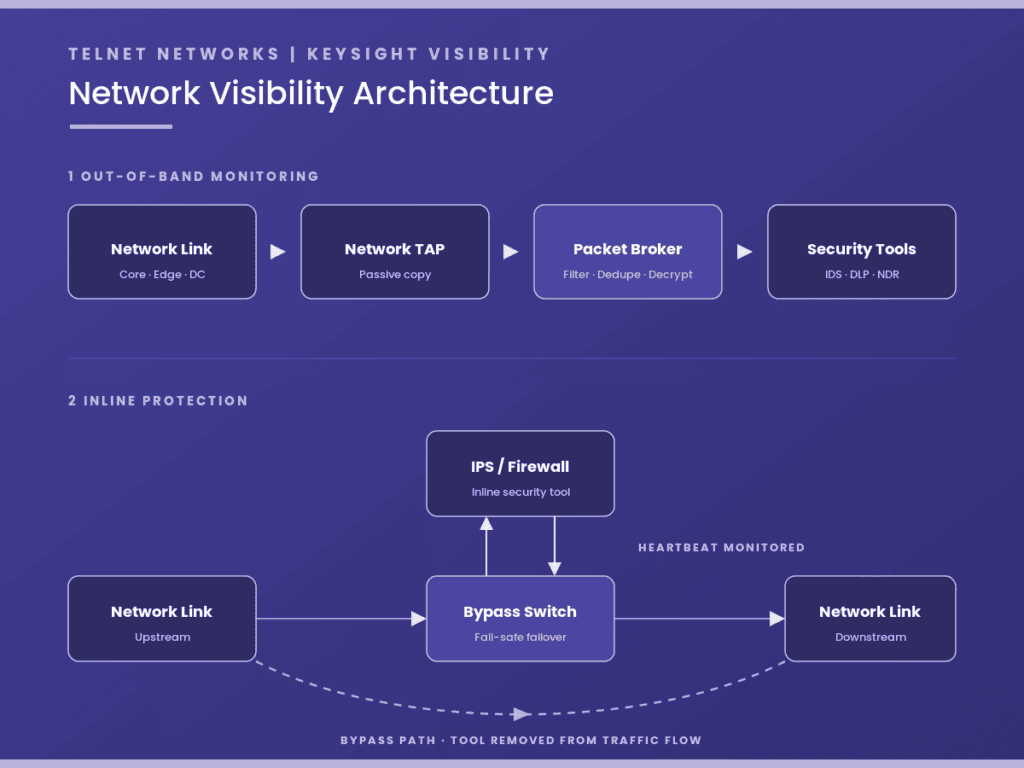
The Toolkit: Network TAPs and Packet Brokers

In a Zero Trust architecture, “visibility” is not a passive luxury—it is the active fuel for your policy engine. To move toward an optimal maturity level, as defined by the CISA Zero Trust Maturity Model, an organization must collect as much information as possible about the current state of assets and communications. This requires two essential components: Network TAPs and Network Packet Brokers (NPBs).

While some organizations attempt to use SPAN (Switch Port Analyzer) ports for visibility, this often creates “Zero Trust Blind Spots.” SPAN ports are prone to packet loss under heavy load and frequently filter out the very error packets and anomalies that indicate a breach. To truly enable Zero Trust, you need a hardware-based foundation that guarantees 100% data fidelity.

Network TAPs: The Foundation of Ground Truth

A Network TAP (Test Access Point) is a purpose-built hardware device that provides an exact, unaltered copy of all traffic flowing between two points in a network.

  • 100% Capture: TAPs capture every bit, byte, and packet, including physical layer errors that traditional software-based monitoring might miss.
  • No Performance Impact: Because they are passive or use “fail-safe” bypass technology, TAPs do not introduce latency or become a point of failure for the production network.
  • Security by Design: Unlike managed switches, TAPs are “invisible” to the network and cannot be remotely hacked or misconfigured to stop traffic.

Network Packet Brokers: The Traffic Cop for Your Security Stack

Once the TAPs have captured the data, it must be delivered to your security tools (like NDR, SIEM, or DLP). However, sending 100% of raw traffic to every tool would quickly overwhelm them, leading to dropped packets and wasted licensing costs. Network Packet Brokers act as the “intelligence layer” between your network and your tools:

  • Aggregation and Filtering: NPBs can take traffic from multiple TAPs and filter out irrelevant data (e.g., streaming video traffic) so your security tools only process what matters.
  • De-duplication: If traffic is captured at multiple points, NPBs remove duplicate packets to ensure tools aren’t working twice as hard for the same insight.
  • Load Balancing: High-speed 100G or 400G traffic can be distributed across multiple lower-speed security appliances, extending the life and ROI of your existing hardware.

Choosing the Right Partner for Your Industry

At Telnet Networks, we partner with the world’s leading visibility vendors to ensure we can match your industry or organization specific requirements. While all of our partners offer comprehensive portfolios of both TAPs and Packet Brokers, they each bring unique strengths to the table:

  • Garland Technology: A leader in securing Critical Infrastructure and Government networks. With US-based manufacturing, Garland is often the preferred choice for Canadian organizations with strict compliance mandates in energy, finance, and healthcare where “Made in North America” and extreme reliability are paramount.
  • Profitap: Focused on high-end Forensics and Deep Packet Capture. Based in Europe, Profitap serves over 1,000 clients globally, including many Fortune 500 companies. Their solutions are ideal for organizations that require specialized, portable, or high-density troubleshooting tools for R&D and complex incident response.
  • Cubro Network Visibility: Known for providing a high ROI in Telecommunications and Data Centers. Cubro is a favorite for service providers and large enterprises looking for high-performance 4G/5G visibility without the burden of annual port or software licensing fees, significantly lowering the Total Cost of Ownership (TCO).
  • Keysight Technologies: Offers perhaps the Broadest and Most Advanced Visibility Portfolio. Serving the aerospace, defense, and automotive sectors, Keysight’s “Vision” series is designed for the most complex hybrid-cloud environments, featuring advanced AI/ML stacks and context-aware application filtering.

By correctly implementing the Enable pillar with these tools, your organization creates a “visibility fabric” that removes the shadows where attackers hide. Only then are you ready for Pillar #2: Protect.

Moving Toward Maturity

Implementing the Enable pillar is the first step in a phased approach. It allows Canadian enterprises to move beyond “just keeping the bad guys out” to a proactive stance where they can find them quickly and limit damage when they do get in.

What’s Next? Establishing visibility is just the beginning. In our next article, we will explore Pillar #2: Protect, focusing on how to use that visibility to enforce least-privilege access and micro-segmentation. Stay tuned as we continue to build out the blueprint for a resilient, Zero Trust-enabled enterprise.

Telnet Networks’ Approach to Zero Trust: A Practical Guide for Modern Enterprises

Zero Trust has quickly evolved from a niche cybersecurity concept into a foundational strategy for organizations looking to secure increasingly distributed, hybrid, and cloud-connected environments. But despite the widespread adoption of Zero Trust terminology, the path to implementation remains complex—and many organizations still struggle to translate theory into operational practice.

At Telnet Networks, we help organizations across Canada build real-world Zero Trust architectures backed by visibility, endpoint assurance, segmentation, identity controls, and continuous monitoring. Our approach is rooted in the principle that Zero Trust is not a product—it’s a strategy supported by coordinated technology, operational alignment, and ongoing improvement.

We provide a clear, jargon-free explanation of Zero Trust and introduce Telnet Networks’ three-pillar model for Zero Trust enablement: Enable, Protect, and Recover.


What Zero Trust Really Means

“Never trust, always verify” is the classic tagline—but it only scratches the surface.
Zero Trust is a security model built on three core principles:

1. Assume Breach

Organizations must plan as though a compromise has already happened.
Security strategies shift from keeping attackers out to limiting their movement, detecting them quickly, and minimizing damage.

2. Verify Explicitly

Every user, device, application, and data request must be authenticated and continuously validated.
This includes:

  • MFA and adaptive authentication
  • Device posture checks
  • Behavioral analytics
  • Location and context-based risk scoring

With stolen credentials involving 86% of breaches, verification cannot stop at the login screen.

3. Least Privilege Access

Provide users only the access they need, for the time they need it, under the conditions appropriate for their role.
This reduces lateral movement and limits insider risk.

Why Zero Trust Is Necessary

Today’s networks no longer have a meaningful perimeter. Cloud adoption, remote work, IoT/OT integration, and SaaS have made traditional “trusted internal, untrusted external” models obsolete.

Attackers have evolved too. AI-powered malware, credential theft, and automated intrusion tools make it easier than ever for threats to bypass traditional defenses.

Organizations need a new default mindset: trust nothing unless continuously verified.

Key Technology Areas That Support Zero Trust

Zero Trust is multi-disciplinary by design. Telnet Networks helps organizations evaluate, integrate, and operationalize the following core building blocks:

Identity & Access Management (IAM)

  • MFA, SSO, RBAC
  • Continuous authentication
  • Context-based and adaptive access controls

Network Segmentation & Micro-Segmentation

  • Reduces lateral movement
  • Isolates sensitive assets
  • Enforces east-west traffic controls

Endpoint Security (EDR/XDR)

  • Device posture checks before granting access
  • AI-enabled threat detection
  • Continuous monitoring for malware and vulnerabilities

Network Visibility & Monitoring

Zero Trust requires deep insight into how traffic moves across the network.
Telnet’s ecosystem includes:

These provide the forensic depth necessary to validate trust, detect anomalies, and respond to threats.

Data Security

  • Encryption at rest, in transit, and in use
  • Secure key management
  • Data access monitoring and anomaly detection
  • Backup, resilience, and recovery tooling

The Telnet Networks Zero Trust Model: Enable, Protect, Recover

While Zero Trust frameworks often focus on design principles, Telnet’s approach emphasizes implementability.
Our three-pillar model ensures the underlying data, detection technology, and response capabilities are aligned.

1. ENABLE — Ensure Data Availability for Trust Decisions

Zero Trust relies heavily on timely, accurate telemetry.
Telnet provides the tools that make trustworthy security analytics possible:

  • Network TAPs and Packet Brokers for complete packet data
  • Traffic aggregation for SIEM, IDS/IPS, NDR, and analytics platforms
  • Real-time and historical visibility for investigations

If data is missing or incomplete, Zero Trust cannot function.

2. PROTECT — Identify, Isolate, and Remove Threats

Protection requires active, integrated security controls:

These tools prevent lateral movement and stop credential-based attacks before they escalate.

3. RECOVER — Prepare for When Breach Happens

No Zero Trust implementation is complete without strong recovery and forensic capabilities.

Telnet supports organizations with:

Recovery closes the loop, ensuring organizations understand what occurred—and how to strengthen defenses going forward.

Challenges Organizations Face on the Zero Trust Journey

Zero Trust is powerful, but it isn’t easy. Common challenges include:

Encryption Blind Spots

Encrypted traffic protects privacy but reduces visibility. DPI, decryption zones, and metadata analysis are essential counterbalances.

User Experience Trade-offs

Too many authentication prompts frustrate users; too few create risk.
Adaptive and context-aware IAM is the solution.

AI-Powered Threats

Attackers now use AI to evade detection, generate phishing campaigns, and automate intrusion attempts.
Organizations must counter with AI-driven analytics and anomaly detection.

Lack of a Cohesive Strategy

Zero Trust fails when implemented in silos.
Network, security, cloud, and application teams must collaborate around a unified plan and departments must be aligned on policies, tools, enforcement and training.

Zero Trust Requires a Phased, Holistic Roadmap

Based on Telnet’s experience, successful Zero Trust initiatives share these characteristics:

  • A multi-year, phased rollout strategy
  • Cross-departmental alignment
  • Harmonized access and security policies
  • Continuous iteration—not a one-and-done project

Zero Trust is a journey, not an appliance.

How Telnet Networks Helps Organizations Move Forward

As a Canadian leader in network visibility, endpoint protection, and cybersecurity enablement, Telnet Networks brings:

  • Over 20 years of enterprise and government experience
  • A best-of-breed technology ecosystem
  • Strong partnerships with innovative OEMs
  • A vendor-agnostic, customer-first consulting approach

Whether building from scratch or strengthening an existing roadmap, Telnet provides the tools, expertise, and guidance needed to translate Zero Trust from theory into operational practice.

Start Your Zero Trust Journey With Telnet

If your organization is evaluating Zero Trust—or needs help advancing an existing initiative—Telnet Networks is ready to help.

Everything You Need to Know About Flyaway Kits — And How to Build One for IT and OT Networks

In the world of network performance and cybersecurity, the ability to move fast can make the difference between a quick fix and a costly outage. That’s where flyaway kits come in — compact, portable, and ready-to-deploy network visibility and monitoring systems designed to travel anywhere you need them.

Whether you’re troubleshooting a remote site, validating a new deployment, or investigating an industrial network incident, a flyaway kit gives you everything you need to capture, analyze, and act on network data in the field.

In this guide, we’ll break down what a flyaway kit is, why they’re so valuable, and how to build the right one for enterprise IT visibility and OT/ICS network monitoring.

What Is a Flyaway Kit?

A flyaway kit is a self-contained, portable network monitoring and analysis solution built for rapid deployment in the field. Think of it as a mini NOC in a box — rugged, compact, and designed to help you gain instant visibility into live network traffic anywhere.

Each kit typically includes:

Flyaway kits are common in telecom, defense, utilities, and enterprise IT — anywhere fast, reliable diagnostics are critical.

Why a Flyaway Kit Matters

When a problem happens outside the lab or NOC, every minute counts. A well-built flyaway kit allows engineers to:

  • Diagnose problems faster – No waiting for remote access or site setup.
  • Collect accurate data – Direct packet capture and real-time visibility.
  • Reduce downtime – Identify and isolate performance or security issues on-site.
  • Work anywhere – From a factory floor to a remote substation or a pop-up site.

In short, flyaway kits bring reliable and fast acting visibility to where the problem is — not the other way around.

Design Priorities: Portability, Reliability, Compatibility

A well-engineered flyaway kit should emphasize:

  • Portability: Compact, lightweight, and quick to deploy — ideally airline carry-on size.
  • Reliability: Proven tools and set ups along with ruggedized hardware and power systems that work in challenging conditions if needed.
  • OT Compatibility: Passive, non-intrusive data access that respects operational safety.
  • Flexibility: Interchangeable SFPs, adapters, and tools to cover multiple network types.
  • Ease of Use: Familiar, pre-configured systems with dashboards ready to run out-of-the-box.

Building a Flyaway Kit for IT / Network Visibility & Packet Capture

If your focus is enterprise, service provider, or data center troubleshooting, your kit should deliver deep packet visibility, high-speed capture and real time analytics without compromising portability.

Typical Build

ComponentRoleRecommended Solutions
Network TAPs / AggregatorsCapture traffic safely and non-intrusivelyGarland Technology copper/fiber portable TAPs, Profitap Booster Aggregator
Capture & Analysis AppliancePerform packet capture, DPI, and traffic replayProfitap IOTA, Allegro Packets Multimeter 1000/3000 Series
Analysis SoftwareView, filter, and interpret trafficProfiShark, Wireshark, Allegro
Timing & SynchronizationEnsure accurate timestampsSafran GPS Sync or integrated modules
Ruggedized Laptop / Mini ServerPortable workstation for analysisToughbook or field laptop with SSD storage
Transport CaseProtect and organize equipmentPelican 1600/1650 series case

With this setup, engineers can perform on-site performance analysis, validate QoS, or capture forensic data in minutes — without impacting live services.

Building a Flyaway Kit for OT / ICS Networks

Industrial environments have unique challenges: legacy devices, sensitive protocols, and air-gapped networks that can’t tolerate disruptions.

An OT/ICS flyaway kit focuses on safe, passive monitoring and asset visibility — helping operators and cybersecurity teams understand what’s really happening on the network.

Typical Build

ComponentRoleRecommended Solutions
Industrial TAPsPassive access to ICS traffic (Modbus, DNP3, PROFINET)Garland Technology Industrial TAPs, Profitap Industrial Series
OT Visibility / Security ApplianceAnalyze OT protocols, assets, and anomaliesNozomi Guardian, Claroty Edge, or portable Allegro Multimeter for performance-level monitoring
Ruggedized Data CollectorCompact compute device with monitoring softwareIntel NUC or Advantech ARK with Nozomi or Zeek installed
Time SynchronizationTimestamp event data accuratelySafran GPS Sync or integrated modules
Visualization & ReportingDashboards for asset inventory and traffic baselinesNozomi Vantage or Claroty xDome
Rugged Field CaseShockproof, weather-resistant transportPelican Storm or Nanuk 935 case

This build allows operators to quickly deploy visibility in industrial or critical infrastructure networks — without interrupting production or compromising safety.

How Flyaway Kits Speed Up Diagnostics

Engineers who rely on flyaway kits report 50–70% faster mean time to resolution (MTTR) on field issues. Why? Because they can capture and analyze traffic instantly, without waiting for remote access, permissions, or central analysis.

A kit can be deployed at a remote branch, in an industrial facility, or during a network migration — and within minutes, provide insight into:

  • Where packets are being dropped
  • Which device is causing latency
  • Whether an issue is network or application-related

In industrial networks, they also help map assets, identify misconfigurations, and detect unauthorized devices — all without downtime.

Bringing It All Together

At Telnet Networks, we help organizations across Canada build customized flyaway kits that meet their exact operational and visibility requirements.
By combining solutions from trusted partners like Profitap, Allegro Packets, Garland Technology, Cubro, and Nozomi Networks, we deliver kits that are:

  • Portable and ruggedized
  • Fully interoperable across IT and OT environments
  • Preconfigured for rapid deployment and analysis

Whether you need a packet capture toolkit for IT troubleshooting or an industrial visibility system for OT security, we can help you design the right flyaway kit — ready to go wherever your network takes you.

Ready to Build Your Own Flyaway Kit?

Contact Telnet Networks to learn more about designing a custom, field-ready flyaway kits for your organization

ProfiShark: Portable, High-Fidelity Packet Capture for Modern Network Troubleshooting

Gain Complete Network Visibility — Anywhere, Anytime

Network professionals know that accurate packet capture is the foundation for diagnosing performance, latency, and security issues. But traditional software-based tools like Wireshark, while powerful, often struggle in real-world, high-speed environments — packet loss, limited timestamp precision, and missed layer 1 errors can compromise your analysis.

That’s why Profitap developed ProfiShark — a family of portable hardware packet capture devices designed for high-fidelity, line-rate network visibility. Whether you’re capturing on copper or fiber links, in the lab or in the field, ProfiShark delivers precision, portability, and reliability far beyond standard NIC-based capture.

Available in models from 100 M to 10 G, and offered in Canada through Telnet Networks, ProfiShark is the ideal companion for Wireshark users who need professional-grade capture accuracy.

Why Choose ProfiShark Over Traditional Wireshark Capture

While Wireshark remains the industry’s most trusted analysis tool, its performance depends on your computer’s network interface. That’s where ProfiShark makes a difference.

1. Complete, Lossless Capture

Each ProfiShark device captures packets in hardware — not through your laptop’s NIC — ensuring zero packet loss, full-duplex monitoring, and accurate timestamps at nanosecond precision.

  • ProfiShark 1G: 10/100/1000 Mb full-duplex capture with 8 ns timestamping
  • ProfiShark 10G: 1/10 Gb capture over copper or fiber with 5 ns timestamping
  • Hardware aggregation, filtering, and slicing ensure efficient, accurate recording even at line rate

2. Seamless Wireshark Integration

ProfiShark connects via USB 3.0 or Thunderbolt and appears directly as a capture interface in Wireshark. You can also capture directly to disk or NAS — perfect for long-term or unattended capture.

“ProfiShark can capture traffic without the need for third-party capture software. This Direct Capture is performed at the driver level.”
— Profitap

3. Portable Design for Field or Lab Use

With dimensions smaller than a smartphone, ProfiShark easily fits in a laptop bag. Just connect the USB 3.0 cable, insert it inline or on a SPAN port, and you’re ready to capture — no rack space or complex setup required.
Perfect for:

  • On-site troubleshooting
  • Remote site diagnostics
  • Proof-of-concept testing
  • Temporary or mobile capture setups

4. Long-Term Capture with NAS Integration

For capturing intermittent issues, ProfiShark can write directly to a Synology NAS or external storage — no host PC required. Capture continuously, split by file size or duration, and analyze later.

ProfiShark Model Overview

ModelNetwork Speeds / MediaKey Features
ProfiShark 100M10/100 Mb EthernetPoE passthrough, 8 ns timestamping, ideal for industrial and legacy networks
ProfiShark 1G10/100/1000 Mb EthernetFull-duplex capture, hardware timestamping, direct-to-disk capture
ProfiShark 1G+10/100/1000 Mb EthernetAdds GPS/PPS timestamping for precise time sync
ProfiShark 10G1/10 Gb copper or fiber (SFP/SFP+)High-speed capture, 5 ns timestamps, hardware filtering and slicing
ProfiShark 10G+1/10 Gb copper or fiberAdds GPS/PPS synchronization for advanced latency and timing analysis

ProfiShark in Action: Real-World Use Cases

For network engineers and IT teams, ProfiShark enables faster, more reliable troubleshooting and performance validation:

  • Enterprise network troubleshooting – Analyze VoIP, jitter, and packet loss with hardware-level accuracy.
  • Data center visibility – Capture full-duplex 10 G traffic without packet loss.
  • Industrial & OT networks – Use ProfiShark 100M for legacy 10/100 Mb links.
  • Service provider testing – Validate SLA compliance with nanosecond timestamping.
  • Forensic or compliance monitoring – Capture continuous traffic via NAS for days or weeks.

How ProfiShark Elevates Wireshark Workflows

If you already use Wireshark, ProfiShark integrates directly into your toolkit — no new analysis software required.
With ProfiShark acting as the capture front-end, you get the same familiar Wireshark interface, but backed by dedicated capture hardware that guarantees fidelity, precision, and complete visibility.

In short: Wireshark analyzes packets. ProfiShark ensures you never miss them.

Why Telnet Networks Recommends ProfiShark

At Telnet Networks, we help Canadian organizations optimize network performance, visibility, and resilience. We recommend ProfiShark to teams that need:

  • Accurate, lossless packet capture for performance and security analysis
  • Portable capture devices for field or remote troubleshooting
  • Integration with existing Wireshark workflows
  • Advanced timestamping for time-sensitive and industrial environments
  • Direct-to-storage recording for long-term or unattended monitoring

Whether you’re troubleshooting latency, verifying SLAs, or capturing forensic data, ProfiShark gives you the visibility you need — wherever the network takes you.

Learn More or Request a Demo

Explore the full ProfiShark product line and learn how it can enhance your network troubleshooting workflow.

Contact Telnet Networks to request a demo or quote.

Cybereason vs. CrowdStrike, SentinelOne, Microsoft Defender, Trellix: A Head-to-Head Comparison

As cyber threats evolve, Canadian businesses need a cybersecurity solution that goes beyond traditional endpoint protection. Cybereason has emerged as a strong competitor in the endpoint detection and response (EDR) and extended detection and response (XDR) market, but how does it compare to industry leaders like CrowdStrike, SentinelOne, Microsoft Defender, and Trellix? We completed a  head to head comparison to find out.

Cybereason: A Brief Overview

Cybereason is renowned for its AI-driven Extended Detection and Response (XDR) platform, designed to provide comprehensive protection across endpoints, networks, cloud environments, and application suites. The platform’s core strength lies in its ability to detect and remediate threats swiftly, enabling organizations to stay ahead of sophisticated cyber adversaries. 

AI/ML-Powered Automation: Cybereason’s Competitive Edge

One of Cybereason’s standout features is its robust integration of AI and machine learning (ML) technologies. By automating the triage, investigation, and remediation of security incidents, Cybereason addresses the challenge of overwhelming alert volumes that many security teams face and significantly reduces response times, allowing security professionals to focus on strategic initiatives rather than being bogged down by manual processes.


1. Threat Detection and AI Capabilities

Modern cybersecurity platforms rely on AI and machine learning (ML) to identify and stop advanced threats. Here’s how Cybereason compares:

FeatureCybereasonCrowdStrikeSentinelOneMicrosoft DefenderTrellix
AI/ML-Powered Threat Detection✅ AI-driven detection with real-time behavioral analytics✅ Strong AI but more focused on indicators of attack (IOAs) than behavioral analytics✅ Uses static and behavioral AI but lacks contextual analysis⚠️ AI-driven but often allows malware execution before reacting⚠️ AI in development, still relies on older signature-based detection
Proactive vs. Reactive Protection✅ Preemptive detection and blocking before malware executes⚠️ Primarily detects threats after execution⚠️ Focuses more on rollback after infection occurs❌ Signature-based, allowing execution before stopping malware❌ Reactive approach with delayed response times
Zero-Day Threat Protection✅ Advanced heuristics and deception technology✅ Uses cloud-based threat intelligence but requires cloud connectivity⚠️ Good detection but relies on rollback rather than early prevention❌ Often misses zero-day threats❌ Limited capabilities, requires additional tools

Advantage: Cybereason

Using AI for behavioral-based detection, stopping attacks before they execute. Cybereason neutralizes threats before they cause harm.


2. Incident Response and Automated Remediation

Speed is critical in responding to security incidents. Here’s how Cybereason compares:

FeatureCybereasonCrowdStrikeSentinelOneMicrosoft DefenderTrellix
Automated Incident Response✅ Fully automated playbooks and real-time response✅ Good response automation but relies on manual intervention for some actions✅ Strong automation but can be complex to configure⚠️ Automated but prone to false positives, requiring manual review❌ Limited automation, heavily reliant on human analysts
Rollback & Self-Healing Capabilities✅ AI-driven remediation without manual intervention⚠️ Requires cloud connectivity for effective rollback✅ Can roll back changes but after damage occurs❌ No built-in rollback, requires Microsoft Intune integration❌ Minimal rollback capabilities

Advantage: Cybereason

Cybereason does not require manual intervention for threat mitigation and has built-in, AI-driven response automation


3. Ransomware Defense

Ransomware is a growing threat for Canadian businesses. Here’s how Cybereason compares:

FeatureCybereasonCrowdStrikeSentinelOneMicrosoft DefenderTrellix
Prevention Before Encryption✅ Stops ransomware before encryption begins⚠️ Can detect ransomware but often reacts after some files are encrypted⚠️ Focuses on rollback after files are encrypted❌ Often allows ransomware execution before detection❌ Limited ransomware-specific defenses
Detection of Ransomware Tactics✅ Uses deception-based detection to detect encryption behavior✅ Strong detection but may require cloud connectivity✅ Detects ransomware but sometimes too late❌ Limited ability to detect modern ransomware variants❌ Older ransomware detection methods struggle with modern threats

Advantage: Cybereason

Cybereason prevents ransomware encryption operates effectively even in isolated environments and neutralizes threats early


4. Ease of Use & Deployment

For Canadian businesses, ease of deployment and management are crucial factors in choosing cybersecurity solutions.

FeatureCybereasonCrowdStrikeSentinelOneMicrosoft DefenderTrellix
Deployment Time✅ Fast deployment, minimal configuration required⚠️ Cloud-based but requires tuning for best performance⚠️ Can be complex to set up for large organizations❌ Requires Microsoft ecosystem for full functionality❌ Lengthy and complex deployment process
User Interface & Dashboard✅ Intuitive UI with AI-driven insights✅ Clean UI but complex policy configurations✅ Good UI but requires technical knowledge❌ Multiple disjointed consoles make management frustrating❌ Outdated interface, requires significant manual effort
Integration With Other Tools✅ Open API and integrates with SIEM/SOAR✅ Strong integration with third-party security tools✅ Works well with cloud services but lacks deep SIEM integration⚠️ Good Microsoft integration but poor support for non-Microsoft environments❌ Limited third-party integrations

Advantage: Cybereason

Fast and easy to deploy with solid third-party integrations and no lock-in


5. Cost & Licensing Model

Total cost of ownership (TCO) is a key factor for Canadian businesses.

FeatureCybereasonCrowdStrikeSentinelOneMicrosoft DefenderTrellix
Pricing Model✅ Transparent, per-endpoint pricing⚠️ Premium pricing, requires add-ons for full features⚠️ Tiered pricing with expensive advanced features❌ Requires E5 licensing, additional costs for full protection❌ Complicated pricing, often expensive
Hidden Costs✅ No hidden costs, full feature set included❌ Additional costs for cloud-based threat intelligence❌ Costs rise with additional automation features❌ Requires paid Microsoft E5 subscription❌ Costs increase with additional endpoint coverage

Advantage: Cybereason

Cybereason is cost-effective, and does not require additional licensing fees for full protection.


Final Verdict: Why Cybereason is the Best Choice for Canadian Businesses

Better AI-driven threat detection than SentinelOne, Microsoft Defender, and Trellix.
More proactive ransomware defense than CrowdStrike and SentinelOne.
Easier to deploy and manage than Microsoft Defender and Trellix.
More cost-effective with no hidden fees than CrowdStrike and Microsoft Defender.

Would you like assistance in evaluating Cybereason for your organization? Contact us today for a consultation and demo! 

Load Balancing Your Security Solution for Fun and Profit!

Maximizing the Value and Resiliency of Your Deployed Enterprise Security Solution with Intelligent Load Balancing

Correctly implementing your security solution in the presence of complex, high-volume user traffic has always been a difficult challenge for network architects. The data in transit on your network originates from many places and fluctuates with respect to data rates, complexity, and the occurrence of malicious events. Internal users create vastly different network traffic than external users using your publically available resources. Synthetic network traffic from bots has exceeded real users as the most prevalent creators of network traffic on the internet . How do you maximize your investment in a security solution while gaining the most value from the deployed solution? The answer is intelligent deployment through realistic preparation.

Let’s say that you have more than one point of ingress and egress into your network, and predicting traffic loads it is very difficult (since your employees and customers are global). Do you simply throw money at the problem by purchasing multiple instances of expensive network security infrastructure that could sit idle at times and then get saturated during others? A massive influx of user traffic could overwhelm your security solution in one rack, causing security policies to not be enforced, while the solution at the other point of ingress has resources to spare.

High speed inline security devices are not just expensive—the more features you enable on them the less network traffic they can successfully parse. If you start turning on features like sandboxing (which spawns virtual machines to deeply analyze potential new security events) you can really feel the pain.

Using a network packet broker with load balancing capability with multiple inline Next Generation Firewalls (NGFW) into a single logical solution, allows you to maximize your secruity investment.  To test the effectiveness we ran 4 scenerio’s using an advanced featured packet broker and load testing tools to see how effective this strategy is.

TESTING PLATFORM

Usung two high end NGFWs, we enabled nearly every feature (including scanning traffic for attacks, identifying user applications, and classifying network security risk based on the geolocation of the client) and load balanced the two devices using an advanced featured packet broker. Then using our load testing tools we created all of my real users and a deluge of different attack scenarios.  Below are the results of 4 testing scenerios

Scenario One: Traffic Spikes

Your 10GbE NGFW will experience inconsistent amounts of network traffic. It is crucial to be able effectively inforce security policies during such events. In the first test I created a baseline of 8Gbps of real user traffic, then introduced a large influx of traffic that pushed the overall volume to 14Gbps. The packet broker load balancer ensured that the traffic was split between the two NGFWs evenly, and all of my security policies were enforced.

Load Balancing Your Security Solution for Fun and Profit!

Figure 1: Network traffic spike

Scenario Two: Endurance Testing

Handling an isolated event is interesting, but maintaining security effectiveness over long periods of time is crucial for a deployed security solution. In the next scenario, I ran all of the applications I anticipated on my network at 11Gbps for 60 hours. The packet broker gave each of my NGFWs just over 5Gbps of traffic, allowing all of my policies to be enforced. Of the 625 million application transactions attempted throughout the duration of the test, users enjoyed a 99.979% success rate.

Load Balancing Your Security Solution for Fun and Profit!

Figure 2: Applications executed during 60 hour endurance test

Scenario Three: Attack Traffic

Where the rubber meets the road for a security solution is during an attack. Security solutions are insurance policies against network failure, data exfiltration, misuse of your resources, and loss of reputation. I created a 10Gbps baseline of the user traffic (described in Figure 2) and added a curveball by launching 7261 remote exploits from one zone to another. Had these events not been load balanced with the packet broker, a single NGFW might have experienced the entire brunt of this attack. The NGFW could have been overwhelmed and failed to inforce policies. The NGFW might have been under such duress mitigating the attacks that legitimate users would have been collateral damage of the NGFW attempting to inforce policies. The deployed solution performed excellently, mitigating all but 152 of my attacks.

Concerning the missed 152 attacks: the load testing tool library contains a comprehensive amount of undisclosed exploits. That being said, as with the 99.979% application success rate experienced during the endurance test, nothing is infallible. If my test worked with 100% success, I wouldn’t believe it and neither should you.

Load Balancing Your Security Solution for Fun and Profit!

Figure 3: Attack success rate

Scenario Four: The Kitchen Sink

Life would indeed be rosy if the totality of a content aware security solution was simply making decisions between legitimate users and known exploits. For my final test I added another wrinkle. The solution also had to deal with large volume of fuzzing to my existing deluge of real users and attacks. Fuzzing is the concept of sending intentionally flawed network traffic through a device or at an endpoint with the hopes of uncovering a bug that could lead to a successful exploitation. Fuzzed traffic can be as simple as incorrectly advertised packet lengths, to erroneously crafted application transactions. My test included those two scenarios and everything in between. The goal of this test was stability. I achieved this by mixing 400Mbps of pure chaos via load testing fuzzing engine, with Scenario Three’s 10Gbps of real user traffic and exploits. I wanted to make certain that my load-balanced pair of NGFWs were not going to topple over when the unexpected took place.

The results were also exceptionally good. Of the 804 million application transactions my users attempted, I only had 4.5 million go awry—leaving me with a 99.436% success rate. This extra measure of maliciousness only changed the user experience by increasing the failures by about ½ of a percent. Nothing crashed and burned.

Load Balancing Your Security Solution for Fun and Profit!

Figure 4: Application Success rates during the “Kitchen Sink” test

Conclusion

All four of the above scenarios illustrate how you can enhance the effectiveness of a security solution while maximizing your budget. However, we are only scratching the surface. What if you needed your security solution to be deployed in a High Availability environment? What if the traffic your network services expand? Setting up the packet broker to operate in HA or adding additional inline security solutions to be load balanced is probably the most effective and affordable way of addressing these issues.

Let us know if you are intrested in seeing a live demonstration of a packet broker load balancing attacks from secruity testing tool over multiple inline security solutions? We would be happy to show you how it is done.

Additional Resources:

Network Packet Brokers

CyPerf