Keysight Network Visibility, Testing and Security: Where Each Piece Fits

Keysight network visibility, TAPs and packet brokers — Telnet Networks vendor spotlight

You can’t secure or troubleshoot traffic you can’t see. That’s an old line, but it has become a harder problem: hybrid cloud, encrypted east-west traffic, high-density AI data centres, and a monitoring toolset that costs more every year to keep fed with the right data.

Keysight Technologies builds most of what solves this. Their network visibility, security and test portfolio — built on the Ixia and NetOptics product lines — covers passive traffic access, intelligent packet distribution, inline failover protection, and pre-deployment threat validation.

Telnet Networks has been designing and deploying these products in Canadian networks for years. This guide is our take on where each piece actually fits: what problem it solves, what it costs you to skip it, and which environments suit it best.

The architecture in four lines

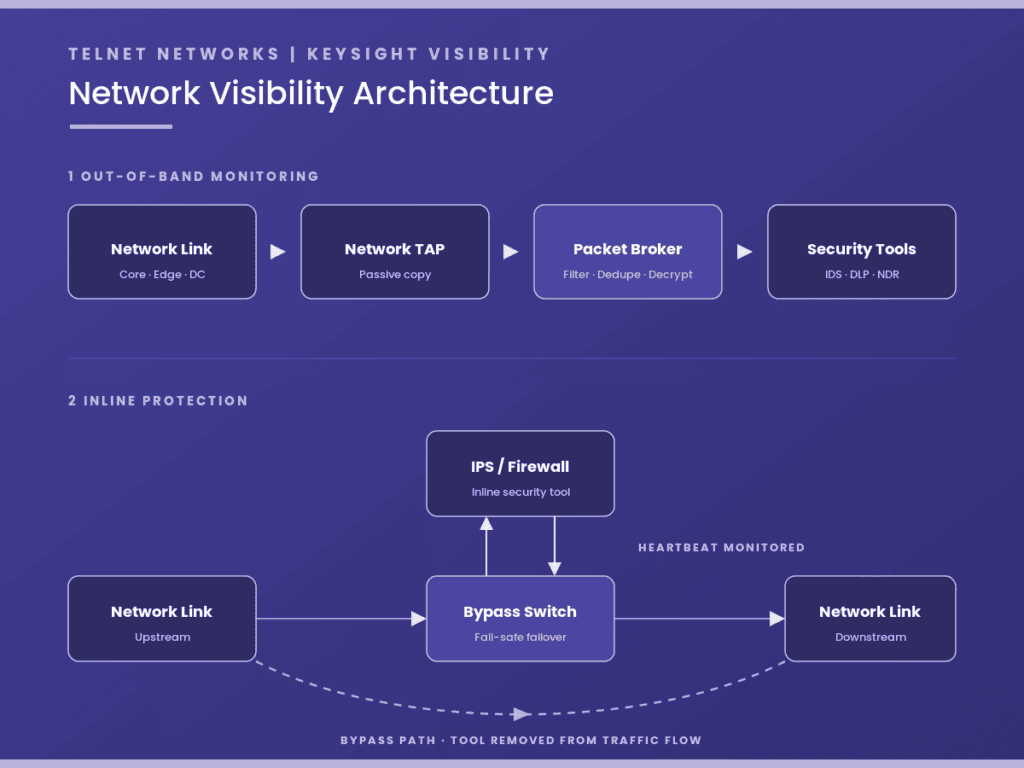
  • Tap it. Network TAPs give you a passive copy of live traffic without touching your production switches.
  • Broker it. Packet brokers filter, deduplicate and decrypt that traffic so each tool receives only what it needs.
  • Protect it. Bypass switches keep the link up when an inline security tool fails or goes down for maintenance.
  • Test it. BreakingPoint and Threat Simulator prove your defences hold up before an adversary finds out for you.
Network visibility architecture: a network TAP feeds a Keysight packet broker that filters and distributes traffic to IDS, DLP and NDR tools; below, a bypass switch monitors an inline IPS or firewall by heartbeat and routes traffic directly link-to-link if the tool fails

The Keysight Visibility and Security Portfolio

1. Network TAPs and Aggregators

If you’re still feeding your monitoring infrastructure entirely from SPAN or mirror ports, you’re likely carrying blind spots you can’t see and adding load to switches that have better things to do. Network TAPs sit passively on the link and hand you a full copy of the traffic instead.

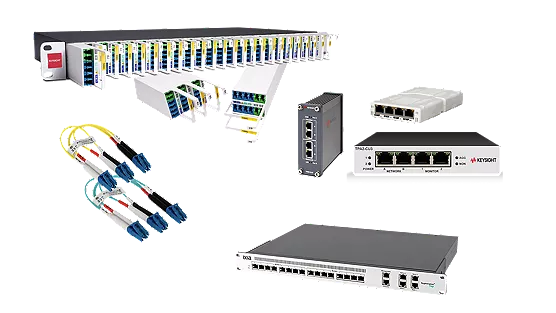
  • Key features: 100% passive traffic capture from 1Gbps to 400Gbps, supporting single-mode, multi-mode and Cisco BiDi fibre. The Flex Tap VHD packs up to 36 taps into 1U. For industrial and outdoor deployments, ruggedized Tough TAPs provide the same passive access in environments that would kill standard hardware.
  • Companion hardware: iLink Aggregators sit behind your TAPs to consolidate multi-link traffic into a smaller number of downstream tool connections — usually the cheapest way to avoid buying tool ports you don’t need.
  • Best aligned for: Provincial and municipal utilities and other ICS/OT operators, where a passive tap is often the only monitoring method an operations group will approve on a control network. Also financial services, healthcare networks, and enterprise data centres where dropped packets aren’t an option.

Our take: the most common thing we find on a first site walk is a monitoring architecture that quietly outgrew its SPAN ports two or three refresh cycles ago. A proper tap plan is usually the least expensive fix on the table, and it’s the one that makes everything downstream work better.

2. Network Packet Brokers and Software-Defined Fabric

Once traffic is tapped, something has to decide where it goes. A packet broker is the traffic controller for your visibility layer — it makes sure each monitoring, forensics and security tool receives the data it needs and nothing it doesn’t.

  • Key features: Built on a hardware-acceleration architecture Keysight describes as zero-packet-loss. The feature stacks layer up: NetStack (aggregation and line-rate filtering), PacketStack (deduplication and header stripping), SecureStack (inline and out-of-band SSL/TLS decryption), and AppStack (Layer 7 application awareness and geographic filtering).
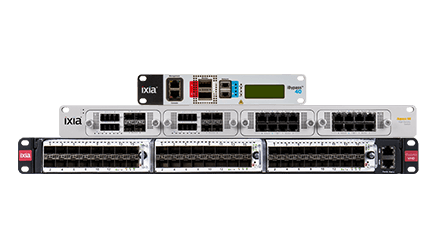
  • Key products: Vision ONE is the standalone platform for a first visibility deployment. Vision Edge 10S (E10S) suits remote offices and smaller data centres where rack space is tight. Vision Edge 400P handles enterprise cores, with 32 ports of 400Gbps processing in a compact form factor.
  • Management overlays: Keysight Vision Orchestrator (KVO) and Ixia Fabric Controller (IFC) Clustering manage distributed multi-hop topologies from a single console, which matters as soon as you have visibility hardware in more than one site.
  • Best aligned for: Telecoms and regional service providers, mid-to-large enterprises, government departments and higher education. If you’re trying to get more out of an expensive tool farm — IDS, DLP, NDR, firewalls — rather than buying more capacity, this is where to start.

Our take: before recommending a Vision platform we’ll usually audit what your existing tools are actually receiving. In most environments a meaningful share of what’s being sent to IDS and DLP is duplicate or irrelevant traffic — capacity you’re already paying for, twice.

3. Bypass Switches (Inline Protection)

Putting a firewall or IPS directly in the traffic path is how you block threats. It’s also how you create a single point of failure. If that device freezes, loses power, or just needs a routine software update, the link goes with it.

Bypass switches solve this by acting as an automatic detour. If the security tool stops responding, the switch routes traffic around it at wire speed and the link stays up.

  • Key features: Fail-safe automated inline protection. The switch monitors connected appliances using configurable “heartbeat” packets and reroutes instantly when one stops answering — so a tool outage doesn’t become a network outage.
  • Topology: Built on the NetOptics legacy, with full support for both active-active and active-passive tool configurations at any scale.
  • Key products: The Keysight iBypass family, including high-density and copper configurations such as iBypass Copper Gen 4, protects critical links without adding latency or configuration overhead.
  • Best aligned for: Hospital networks and regional health authorities, Canadian financial institutions working to OSFI operational-resilience expectations, e-commerce platforms, and any mission-critical infrastructure where downtime maps directly to lost revenue or disrupted patient and customer operations.

Our take: the bypass switch is the least glamorous line item in a visibility design and the one clients thank us for most often. It typically pays for itself the first time an inline tool needs an unscheduled reboot during business hours.

4. Cloud Visibility and Performance Monitoring

When workloads move to public, private or hybrid cloud, most organizations lose the packet-level visibility they relied on for years on-premises. Keysight closes that gap by extending the same visibility intelligence into virtualized and software-defined environments, so your tools keep a single unified view no matter where the workload runs.

  • Key features: Vision Edge OS on open-compute hardware, paired with virtual cloud taps, lets you monitor public, private and hybrid fabrics including AWS and Azure. For workloads that need precise timing, TimeKeeper® provides verifiable clock synchronization.
  • Best aligned for: Organizations partway through a cloud migration who still need on-premises-grade packet visibility, SaaS providers, and any environment with microsecond timing or timestamp-compliance requirements.

A note on data residency: for public sector, healthcare and regulated financial clients, where visibility and telemetry data lives is as much of a design constraint as throughput. Cloud visibility deployments need to account for it from the start, not as a retrofit. Telnet supports Canadian deployments end to end and can help scope an architecture that keeps monitoring data where your policy requires it.

5. Network Test and Security Validation

Visibility is half the job. The other half is knowing how your defences actually behave under pressure — before a real adversary finds out for you.

Plenty of organizations run on baseline configurations and hope for the best, with no evidence of how the security stack performs under load. Keysight’s test portfolio lets you safely generate large-scale application traffic and simulate real attack techniques inside your own environment, so your team can demonstrate the defences work rather than assume they do.

  • Key features: BreakingPoint and BreakingPoint Cloud run application stress tests and simulate real-world attack traffic safely. The SaaS-based Threat Simulator runs continuous Breach and Attack Simulation (BAS) against your live environment without disrupting it. Both are fed by Keysight’s Application and Threat Intelligence (ATI) team, which maintains the threat and application definitions.
  • Best aligned for: SecOps and cybersecurity engineering teams, QA and lab environments, and compliance functions that need documented evidence of control effectiveness rather than a configuration screenshot.

Our take: for teams building a validation practice from scratch, we’ll usually suggest starting with a scoped BreakingPoint engagement rather than a full platform purchase. It’s a faster way to find out what you’d actually use.

Quick Reference

Product categoryPrimary focusBest use case
Network TAPsPassive, raw packet captureReplacing overloaded SPAN ports; monitoring OT/ICS links without touching the control network
Packet Brokers (Vision series)Filtering, deduplication, SSL decryption, tool load balancingGetting more out of an existing tool farm; sending targeted traffic to specific appliances
Bypass Switches (iBypass)Inline high availability and tool failoverKeeping critical links up when an inline firewall or IPS fails or needs patching
Test Suite (BreakingPoint / Threat Simulator)Threat simulation and network stress testingProving control effectiveness; testing resilience before production deployment

Where to start

Building a visibility layer that holds up requires the right foundation — and most of the cost of getting it wrong shows up later, in tool licences you didn’t need and blind spots you didn’t know about.

As a Keysight partner, Telnet Networks can help you assess your current topology, design a visibility architecture that fits your environment, and choose the right mix of TAPs, packet brokers and test platforms for the budget you have.

Two ways to start:

  • Not ready to buy anything yet? Ask us for a network visibility assessment. We’ll review your current TAP and SPAN architecture and tell you where the gaps are.
  • Have a specific project in mind? Contact our team to talk to a technical specialist or request a proof-of-concept design built for your environment.

UNDERSTANDING ZERO TRUST — WHY VISIBILITY IS THE BEDROCK OF “NEVER TRUST, ALWAYS VERIFY”

In our first post, we demystified the core philosophy of Zero Trust—shifting from the outdated “castle-and-moat” perimeter to a model that assumes a breach has already occurred. But once you’ve embraced the mindset of Never Trust, Always Verify, a practical question emerges: How do you verify what you cannot see?

At Telnet Networks, we break Zero Trust down into three actionable pillars: Enable, Protect, and Recover. Today, we’re diving into the first and most critical foundation: Pillar #1 – Enable.

The “Enable” Pillar: Fueling the Trust Engine

The “Enable” phase isn’t about blocking traffic or setting up firewalls—that comes later. This pillar is focused entirely on data availability.

Zero Trust is a data-hungry architecture. To make real-time, “verify explicitly” decisions, your security tools need a constant stream of high-fidelity telemetry from every corner of your network. If your security stack is blind to certain traffic segments, your Zero Trust strategy isn’t just incomplete, it’s dangerous.

The Telnet Perspective: You can’t secure what you don’t monitor. Enabling Zero Trust means ensuring that every packet is captured, aggregated, and delivered to the tools that need it.

Why Visibility is the Foundation

Reputable frameworks like NIST SP 800-207 and the CISA Zero Trust Maturity Model emphasize that visibility and analytics are the cross-cutting capabilities that support every other pillar of security. Without the “Enable” phase, your organization faces several “Zero Trust Killers”:

  • Encryption Blind Spots: While encryption is vital for privacy, it can hide malicious activity.
  • Siloed Data: If your SIEM or NDR only sees a fraction of your traffic, its AI-driven “anomalies” are just guesses.
  • Shadow IT: Unauthorized devices and applications can’t be “verified” if they are invisible to the network management layer.

The Toolkit: Network TAPs and Packet Brokers

In a Zero Trust architecture, “visibility” is not a passive luxury—it is the active fuel for your policy engine. To move toward an optimal maturity level, as defined by the CISA Zero Trust Maturity Model, an organization must collect as much information as possible about the current state of assets and communications. This requires two essential components: Network TAPs and Network Packet Brokers (NPBs).

While some organizations attempt to use SPAN (Switch Port Analyzer) ports for visibility, this often creates “Zero Trust Blind Spots.” SPAN ports are prone to packet loss under heavy load and frequently filter out the very error packets and anomalies that indicate a breach. To truly enable Zero Trust, you need a hardware-based foundation that guarantees 100% data fidelity.

Network TAPs: The Foundation of Ground Truth

A Network TAP (Test Access Point) is a purpose-built hardware device that provides an exact, unaltered copy of all traffic flowing between two points in a network.

  • 100% Capture: TAPs capture every bit, byte, and packet, including physical layer errors that traditional software-based monitoring might miss.
  • No Performance Impact: Because they are passive or use “fail-safe” bypass technology, TAPs do not introduce latency or become a point of failure for the production network.
  • Security by Design: Unlike managed switches, TAPs are “invisible” to the network and cannot be remotely hacked or misconfigured to stop traffic.

Network Packet Brokers: The Traffic Cop for Your Security Stack

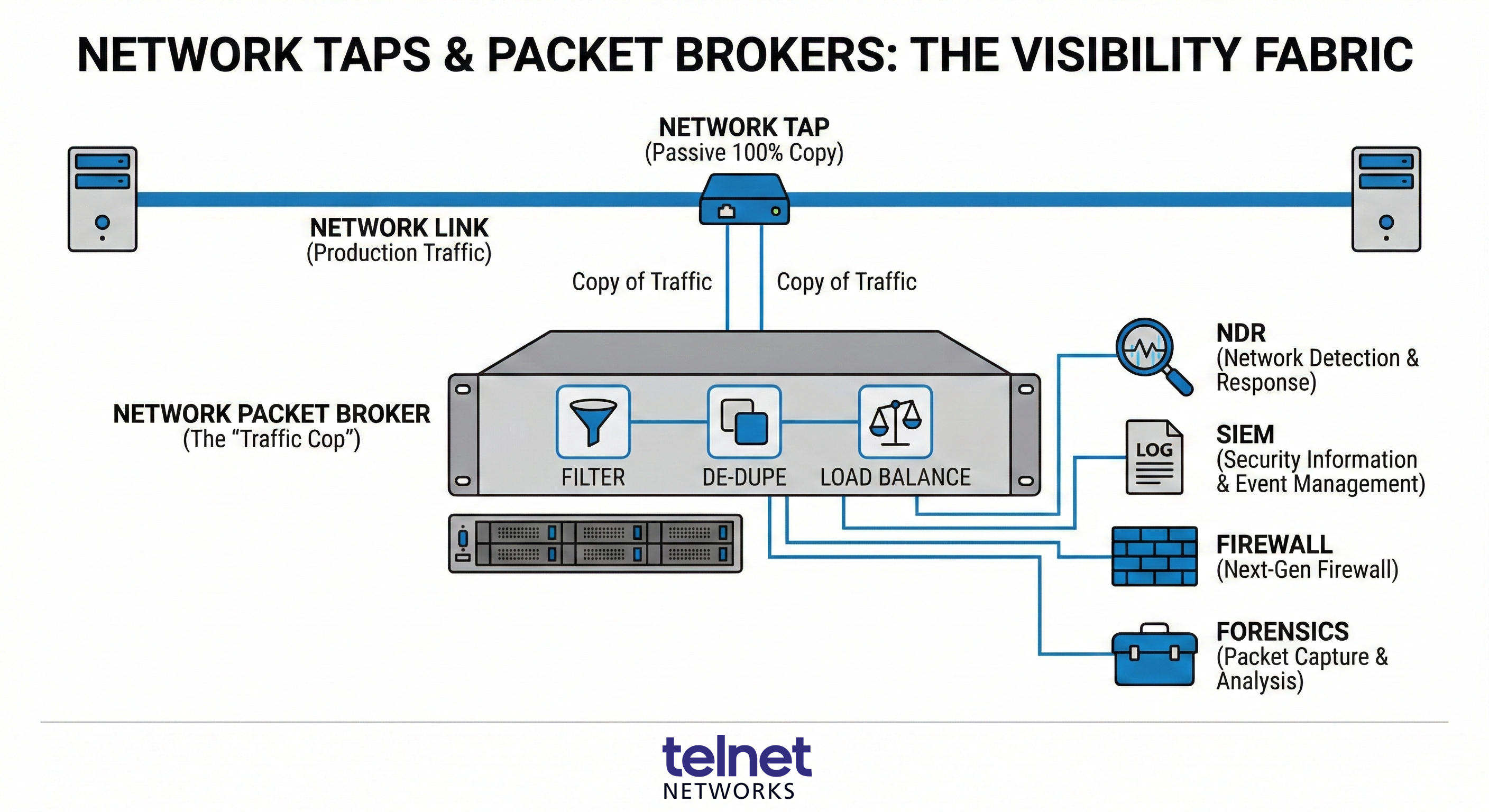
Once the TAPs have captured the data, it must be delivered to your security tools (like NDR, SIEM, or DLP). However, sending 100% of raw traffic to every tool would quickly overwhelm them, leading to dropped packets and wasted licensing costs. Network Packet Brokers act as the “intelligence layer” between your network and your tools:

  • Aggregation and Filtering: NPBs can take traffic from multiple TAPs and filter out irrelevant data (e.g., streaming video traffic) so your security tools only process what matters.
  • De-duplication: If traffic is captured at multiple points, NPBs remove duplicate packets to ensure tools aren’t working twice as hard for the same insight.
  • Load Balancing: High-speed 100G or 400G traffic can be distributed across multiple lower-speed security appliances, extending the life and ROI of your existing hardware.

Choosing the Right Partner for Your Industry

At Telnet Networks, we partner with the world’s leading visibility vendors to ensure we can match your industry or organization specific requirements. While all of our partners offer comprehensive portfolios of both TAPs and Packet Brokers, they each bring unique strengths to the table:

  • Garland Technology: A leader in securing Critical Infrastructure and Government networks. With US-based manufacturing, Garland is often the preferred choice for Canadian organizations with strict compliance mandates in energy, finance, and healthcare where “Made in North America” and extreme reliability are paramount.
  • Profitap: Focused on high-end Forensics and Deep Packet Capture. Based in Europe, Profitap serves over 1,000 clients globally, including many Fortune 500 companies. Their solutions are ideal for organizations that require specialized, portable, or high-density troubleshooting tools for R&D and complex incident response.
  • Cubro Network Visibility: Known for providing a high ROI in Telecommunications and Data Centers. Cubro is a favorite for service providers and large enterprises looking for high-performance 4G/5G visibility without the burden of annual port or software licensing fees, significantly lowering the Total Cost of Ownership (TCO).
  • Keysight Technologies: Offers perhaps the Broadest and Most Advanced Visibility Portfolio. Serving the aerospace, defense, and automotive sectors, Keysight’s “Vision” series is designed for the most complex hybrid-cloud environments, featuring advanced AI/ML stacks and context-aware application filtering.

By correctly implementing the Enable pillar with these tools, your organization creates a “visibility fabric” that removes the shadows where attackers hide. Only then are you ready for Pillar #2: Protect.

Moving Toward Maturity

Implementing the Enable pillar is the first step in a phased approach. It allows Canadian enterprises to move beyond “just keeping the bad guys out” to a proactive stance where they can find them quickly and limit damage when they do get in.

What’s Next? Establishing visibility is just the beginning. In our next article, we will explore Pillar #2: Protect, focusing on how to use that visibility to enforce least-privilege access and micro-segmentation. Stay tuned as we continue to build out the blueprint for a resilient, Zero Trust-enabled enterprise.

Introducing Cubro’s EXA48800: Advanced Network Visibility for High-Speed Infrastructure

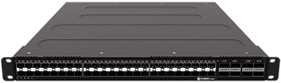
EXA48800 Network Packet Broker

In today’s complex digital environments, where data moves at extreme speeds and network architectures span multiple layers, visibility is no longer optional. The Cubro EXA48800 Network Packet Broker is a high-performance visibility appliance designed to give network, security, and operations teams the clarity they need to monitor, analyze, and secure even the most demanding infrastructures.

EXA48800: Power and Precision for Modern Network Visibility

EXA48800 Network Packet Broker image

The EXA48800 stands at the forefront of Cubro’s network visibility portfolio, purpose-built for high-speed environments where performance, accuracy, and flexibility are non-negotiable. Designed to handle everything from 10 Gbps access links to 100 Gbps backbone traffic, it combines a multi-core programmable switch with dual high-performance ARM CPUs to deliver exceptional processing power and control.

Built to Handle Today’s Most Demanding Networks

Intelligent multi-speed traffic filtering and balancing – Seamlessly supports 1, 10, 25, 40, and 100 Gbps links, ensuring the right traffic reaches the right monitoring and security tools without overload.

High-density, flexible port design – Up to 48 ports for 10/25 Gbps and 8 ports for 40/100 Gbps provide the scalability and breakout flexibility needed to adapt as networks evolve.

Advanced packet inspection – Full IPv6 support and deep packet payload filtering deliver richer insight into modern traffic patterns beyond basic headers.

Comprehensive tunnel awareness – Unlock visibility into encapsulated traffic by filtering inside VXLAN, MPLS, GTP, ERSPAN, and other tunnels, eliminating blind spots across overlay networks.

More than a packet broker, the EXA48800 is a powerful traffic intelligence platform that delivers precisely curated data to each connected tool, maximizing value while minimizing noise.

Why the EXA48800 Makes a Difference

Expose hidden traffic – As networks grow more virtualized and encrypted, critical data often disappears into tunnels. The EXA48800 brings that traffic back into view, helping teams quickly identify performance issues and security threats.

Get more from your tools – By filtering, deduplicating, and optimizing traffic before it reaches monitoring and security platforms, the EXA48800 improves tool efficiency, reduces processing strain, and accelerates time to insight.

Invest with confidence – Built with a future-ready architecture that supports higher speeds, modern protocols, and flexible port configurations, the EXA48800 is designed to scale with your network and protect your investment over time.

Ideal for Complex, High Velocity Networks

The EXA48800’s advanced features make it an ideal solution for organizations operating large, complex, and high-velocity networks:

  • Cloud and Service Providers (Telcos): The deep tunnel awareness (VXLAN, MPLS, GTP) is essential for monitoring complex, virtualized backbone traffic and ensuring service quality across their vast, multi-layer architectures.
  • Large Enterprises and Data Centers: Any organization with a high-speed backbone (40/100 Gbps) and high-density port requirements will find the EXA48800 critical for reducing processing strain on their security and monitoring platforms.
  • Network Operations (NetOps) and Security Operations (SecOps) Teams: By filtering, deduplicating, and optimizing traffic, the EXA48800 ensures each monitoring or security tool receives only the precise data it needs. This improves tool efficiency and accelerates time to insight, enabling faster identification of critical performance issues and security threats.

The Advantage of Transparent Licensing

Beyond technical performance, the EXA48800, and Cubro’s entire Packet Broker lineup offers a significant operational and financial advantage when compared to vendors like Gigamon and Keysight: a simple licensing model.

  • No Additional Fees for Essential Features: Cubro believes essential intelligence should be built-in. This means the powerful core capabilities, including comprehensive tunnel awareness (VXLAN, MPLS, GTP, ERSPAN) and advanced packet inspection, are available without the need for expensive add-on licenses.
  • Invest with Confidence: Cubro’s architecture is designed to scale with your network and protect your investment over time. This approach eliminates the “surprise cost” of future feature activation or annual fees to keep your hardware from turning into a paperweight.

This streamlined approach reduces unnecessary operational complexity and ensures you get the maximum value from your network visibility platform from day one.

As networks scale and traffic patterns grow more dynamic, the need for intelligent visibility becomes critical. The Cubro EXA48800 meets this challenge with high throughput, flexible filtering, tunnel awareness, and powerful traffic engineering, making it a strong foundation for organizations that rely on real time performance, security insights, and efficient tool utilization.

If this product is something you would like to discuss for your infrastructure, please contact our sales team today.

Network Visibility: Security Applications of Network TAPs, Brokers and Bypass Switches

Security starts with awareness, but what happens when critical traffic slips through unnoticed? For security teams and network administrators alike, network visibility isn’t just a luxury—it’s a necessity. As threats become more sophisticated, ensuring complete, real-time access to network traffic is the first step in defending against malicious activity. This is where technologies like Network TAPs, Network Packet Brokers, and Bypass Switches come into play.

What is Network Visibility?

Network visibility refers to the ability to monitor all traffic flowing across a network—north-south (between users and data centers) and east-west (between internal systems, users and endpoints). Without it, blind spots emerge, leaving room for attackers to move undetected.

Visibility tools like Network TAPs (Test Access Points), Network Packet Brokers (NPBs), and Bypass Switches are the foundation for building a resilient, secure, and high-performance network. Each plays a unique role in feeding security appliances the data they need to function effectively.

Network TAPs: Your First Line of Insight

Network TAPs (Test Access Points) are dedicated hardware devices designed to deliver a real-time, unfiltered copy of network traffic. Placed in-line between network segments, TAPs allow all data to flow through uninterrupted while simultaneously duplicating that traffic for monitoring and security tools. Unlike other methods that may filter or miss packets under load, TAPs provide a complete and accurate view of every packet traversing the network—ensuring your tools receive 100% of the data, with zero interference, loss, or blind spots.

Security Use Cases:

Intrusion Detection Systems (IDS) rely on clean, complete traffic to detect anomalies.

Forensics and packet capture solutions use TAPs to store traffic for analysis after an incident.

Decryption appliances can tap into SSL/TLS sessions for deep inspection.

Network TAPs are available from vendors like Garland Technology, Cubro, Profitap and Keysight.

Network Packet Brokers: Smart Traffic Management

Gaining visibility is just the first step—managing that traffic effectively is where the real challenge begins. This is where Network Packet Brokers (NPBs) come into play. These smart, purpose-built devices aggregate traffic from multiple sources, then filter, de-duplicate, and reformat it before sending it to your security and monitoring tools. 

By delivering only the relevant data in the optimal format, NPBs reduce tool overload, eliminate unnecessary noise, and ensure that each system receives precisely what it needs to operate at peak efficiency.

Security Use Cases:

Traffic filtering: Send only relevant data to specific security appliances to reduce overload. 

Load balancing: Distribute traffic across multiple tools for redundancy and scalability. 

Packet deduplication and header stripping: Eliminate noise and unnecessary metadata that can bog down inspection.

Bypass Switches: High Availability for In-line Security

Bypass Switches, unlike TAPs and Network Packet Brokers, are purpose-built for in-line security tools—such as firewalls, intrusion prevention systems (IPS), and secure web gateways—that actively inspect and control live traffic. Because these tools sit directly in the path of network data, any failure or maintenance downtime can disrupt the flow of traffic and impact availability. Bypass switches solve this challenge by intelligently redirecting traffic around the in-line device if it becomes unresponsive or needs to be taken offline. This ensures continuous uptime, minimizes risk, and allows security teams to maintain and upgrade in-line defenses without interrupting business operations.

Security Use Cases:

Fail-safe failover: If an in-line appliance fails or is taken down for maintenance, bypass switches keep traffic flowing uninterrupted.

Heartbeat monitoring: Ensure that in-line tools are healthy and responsive.

Scheduled updates and maintenance windows: Perform patching or upgrades without interrupting traffic.

The Power of an Integrated Visibility Fabric

Individually, TAPs, Brokers, and Bypass Switches solve specific problems. Together, they form a visibility fabric—a unified, scalable approach to traffic monitoring that supports both performance and security initiatives.

If you’re struggling with visibility gaps or underperforming security tools, it’s time to rethink your monitoring strategy. Contact the Telnet Networks sales team to learn how we can help you deploy the right mix of Network TAPs, Network Packet Brokers, and Bypass Switches  from market leading and innovative partners like Garland Technology, Cubro, Profitap and Keysight to secure your infrastructure from the ground up.

Inspecting SSL Traffic

A delicate balancing act is taking place on networks globally. It is the balance between applying strong protective measures to keep data safe and unintentionally concealing new IT security vulnerabilities. And it all centers on SSL (Secure Socket Layer) encryption. Just as SSL encryption protects certain details of a transaction, it can also conceal and protect malicious cyberthreats. This means it is essential for organizations to decrypt and inspect SSL traffic, to be sure it is not being used to propagate malware.

This paper describes the current state of SSL traffic inspection and how organizations can gain full visibility into what is happening in their networks and mission-critical applications.

What You’ll Learn:

  • ​What is SSL encryption, and why should organizations take it more seriously?
  • Why is network visibility so essential is this context?
  • What are the most tangible threats, and threat indicators?
  • What performance problems exist for firewalls, antivirus, antibot and application monitoring tools?

Download the White Paper from Ixia on Inspecting SSL Traffic below to learn more

 Thanks to Ixia for this article

Ixia Special Edition Network Visibility For Dummies

Advanced cyber threats, cloud computing, and exploding traffic volume pose significant challenges if you are responsible for your organization’s network security and performance management. The concept of ‘network visibility’ is frequently introduced as the key to improvement. But what exactly is network visibility and how does it help an organization keep its defenses strong and optimize performance? This e-book, presented in the straight-forward style of the For Dummies series, describes the concept from the ground up. Download this guide to learn how to use a visibility foundation to access all the relevant traffic moving through your organization and deliver the information you need to protect and maximize customer experience.

Download your free copy of Ixia’s Special Edition of Network Visibility for Dummies E-Book below

Thanks to Ixia for this article and content.

Ixia Has Your Secret Weapon Against SSL Threats

It has finally happened: thanks to advances in encryption, legacy security and monitoring tools are now useless when it comes to SSL. Read this white paper from Ixia, to learn how this negatively impacts visibility into network applications, such as e-mail, e-commerce, online banking, and data storage. Or even worse, how advanced malware increasingly uses SSL sessions to hide, confident that security tools will neither inspect nor block its traffic.

  • ​Consider the following challenges:
  • Visibility into ephemeral key traffic
  • Coping with CPU-intensive encryption and decryption tasks
  • Chaining and handling multiple security tools
  • Meeting the demands of regulatory compliance

The very technology that made our applications secure is now a significant threat vector. The good news is, there is an effective solution for all of these problems. Learn how to eliminate SSL related threats in this white paper.

Thanks to Ixia for this article

Infosim’s Veni, Vidi, Vici: Seeing as an integral part of conquering your network Webinar

Infosim’s Global Webinar

Julius Caesar knew that, in order to conquer an issue, you need to get a good overview of the situation you are facing. In this Webinar, Infosim shows you how an ideal visualization solution can help you conquer your network issues.

Join Paul Krochenski, Sales Manager at Infosim®, and Jason Farrer, Sales Engineer at Infosim®, for a Webinar to find out more about the powerful visualization options offered by StableNet®.

Key Learning Objectives:

  • ​Unified visualization as a key to success
  • Getting to the point with customizable dashboards and reports
  • Learning from our customers’ best practices [live demo]

 Click here to register for a free 30 day trial of Infosim’s StableNet

Thanks to Infosim for this article and webinar.

Private Cloud: The ABCs of Network Visibility

Cloud computing has become the de facto foundation for digital business. As more and more enterprises move critical workloads to private and public clouds, they will face new challenges ensuring security, reliability, and performance of these workloads. If you are responsible for IT security, data center operations, or application performance, make sure you can see what’s happening in the cloud. This is the first of two blogs on the topic of cloud visibility and focuses on private cloud.

VISIBILITY CHALLENGES

If you wondering why cloud visibility is important, consider the following visibility-related concerns that can occur in private cloud environments.

1. Security blind spots. Traditional security monitoring relies on intercepting traffic as it flows through physical network devices. In virtualized data centers and private clouds, this model breaks down because many packets move between virtual machines (VMs) or application instances and never cross a physical “wire” where they can be tapped for inspection. Because of these blind spots, virtual systems can be tempting targets for malicious breaches.

2. Tools not seeing all relevant data. The point of visibility is not merely to see cloud data, but to export that data to powerful analytics and reporting tools. Tools that receive only a limited view of traffic will have a harder time analyzing performance issues or resolving latency issues, especially as cloud traffic increases. Without access to data from cloud traffic, valuable clues to performance issues may not be identified, which can delay problem resolution or impact the user experience.

3. Security during data generation. Some organizations may use port mirroring in their virtualization platform to access traffic moving between virtual machines. However, this practice can create security issues in highly-regulated environments. Security policies need to be consistently applied, even as application instances move within the cloud environment.

4. Complexity of data collection. With multiple data center and cloud environments, gathering all the relevant data needed by security and monitoring tools becomes complex and time-consuming. Solutions that make it easy to collect traffic from cloud and non-cloud sources can lead to immediate operational savings.

5. Cost of monitoring in the data center. The total cost of a private cloud will rise with the volume of traffic that needs to be transported back to the data center for monitoring. The ability to filter cloud traffic at its source can minimize backhaul and the workload on your monitoring tools.

CLOUD VISIBILITY USE CASES

Given these issues, better visibility can provide valuable benefits to an organization, particularly in:

Security and compliance: Keeping your defenses strong in the cloud, as you do in the data center, requires end-to-end visibility for adequate monitoring and control. Packets that are not inspected represent unnecessary risk to the organization and can harbor malware or other attacks. Regulatory compliance may also require proof that you have secured data as it moves between virtual instances.

Performance analytics: As with security, analysis is dependent on having the necessary data—before, during, and after cloud migration. Your monitoring tools must receive the right inputs to produce accurate insights and to quickly detect and isolate performance problems.

Troubleshooting: If an application that runs in your virtual data center experiences an unusual slow-down, how will you pinpoint the source of the problem? Packet data combined with application-layer intelligence can help you isolate traffic associated with specific combinations of application, user, device, and geolocation, to reduce your mean-time-to-resolution.

In each of these areas, you need the ability to see all of the traffic moving between virtual resources. Without full visibility to what’s happening in your clouds, you increase your risk for data breaches, delays in problem resolution, and loss of productivity or customer satisfaction.

VISIBILITY SOLUTIONS

 So, if cloud visibility is essential to security and application performance, what can you do to address the blind spots that naturally occur? Here are a few things to look for:

Virtual Taps 

Tapping is the process of accessing virtual or cloud packets in order to send them to security and performance monitoring tools. In traditional environments, a physical tap accesses traffic flowing through a physical network switch. In cloud environments, a virtual tap is deployed as a virtual instance in the hypervisor and:

  • ​Accesses all traffic passing between VMs or application instances
  • Provides basic (Layer 2-4) filtering of virtual traffic

For maximum flexibility, you should choose virtual taps like those in Ixia CloudLens Private that support all the leading hypervisors, including OpenStack KVM, VMware ESXi/NSX, and Microsoft Hyper-V and are virtual switch agnostic.

Virtual Packet Processors 

Packet processing is used for more advanced manipulation of packets, to trim the data down to only what is necessary, for maximum tool efficiency. Look for solutions that provide data aggregation, deduplication, NetFlow generation, and SSL decryption. Ixia CloudLens Private packet processing can also do more granular filtering using application intelligence to identify traffic by application, user, device, or geolocation. You can do advanced packet processing using a physical packet broker by transmitting your cloud data back to the data center. Teams that already have physical packet brokers in place, or are new to monitoring cloud traffic, may choose this approach. Another approach is to perform advanced packet processing right in the cloud. Only Ixia offers this all-cloud solution. With this option, you can send trimmed data directly to cloud-based security or analysis tools, eliminating the need for backhaul to the data center. This can be an attractive option for organizations with extremely high traffic volume.

Common Management Interface

Deploying cloud is complicated enough without having to worry about how to get an integrated view across physical and virtual traffic. Ixia’s CloudLens solution provides a comprehensive graphical view of all your network traffic, from all sources. With the power of application intelligence, the Ixia dashboard can tell you where all your traffic is coming from, which applications and locations are the most active, and which operating systems and devices are on the network—valuable information for performance management.

SUMMARY

 As you move more workloads to private cloud environments, be sure to consider a visibility solution that will let you access and visualize your cloud traffic. Don’t let blind spots in your network result in security breaches, application bottlenecks, or dissatisfied users.

Thanks to Ixia and author Lora O’Haver for this article.

Viavi: Nearly 90 Percent of Enterprise Network Teams Spend Time Troubleshooting Security Issues; 80 Percent Report More Time Spent on Security vs. Last Year

Tenth Annual “State of the Network” Global Survey from Viavi Reveals Network and Security Trends from over 1,000 Network Professionals

In April 2017, Viavi Solutions (NASDAQ: VIAV) released the results of its tenth annual State of the Network global study today. This year’s study focused on security threats, perhaps explaining why it garnered the highest response rate in the survey’s history. Respondents included 1,035 CIOs, IT directors, and network engineers around the world. The study is now available for download.

“As our State of the Network study shows, enterprise network teams are expending more time and resources than ever before to battle security threats. Not only are they faced with a growing number of attacks, but hackers are becoming increasingly sophisticated in their methods and malware,” said Douglas Roberts, Vice President and General Manager, Enterprise & Cloud Business Unit, Viavi Solutions. “Dealing with these types of advanced, persistent security threats requires planning, resourcefulness and greater visibility throughout the network to ensure that threat intelligence information is always at hand.”

Highlights of the 2017 study include:

  • ​ Network team members’ involvement in security: Eighty-eight percent of respondents say they are involved in troubleshooting security-related issues. Of those, nearly 80 percent report an increase in the time they spend on such issues, with nearly three out of four spending up to 10 hours a week on them.
  • Evolution of security threats: When asked how the nature of security threats has changed in the past year, IT teams have identified a rise in email and browser-based malware attacks (63 percent), and an increase in threat sophistication (52 percent). Nearly one in three also report a surge in distributed denial of service (DDos) attacks.
  • Key sources of security insight: Syslogs were cited by nearly a third of respondents as the primary method for detecting security issues, followed by long-term packet capture and analysis (23 percent) and performance anomalies (15 percent).
  • Overall factors driving network team workload: Bandwidth usage in enterprises continues to surge, with two out of three respondents expecting bandwidth demand to grow by up to 50 percent in 2017. This trend is in turn driving increased adoption of emerging technologies including software-defined networks (SDN), public and private clouds and 100 Gb. Network teams are managing these major initiatives while simultaneously confronting an aggressive rise in security issues.

 “A combination of new technology adoption, accelerating traffic growth and mounting security risks has spawned unprecedented challenges throughout the enterprise market,” commented Shamus McGillicuddy, Senior Analyst at Enterprise Management Associates. “The need to detect and deal with security threats is notably complicated by the diverse mix of today’s enterprise traffic, which spans across virtual, public and hybrid cloud environments in addition to physical servers.”

Key takeaways: what should IT service delivery teams do?

  • ​Know your “normal” – Recognizing abnormal traffic is critical for pinpointing an ongoing attack or security issue. Start comparing network traffic and behavior over points in time, either manually with freeware analyzer Wireshark, or using automated benchmarking in commercial network performance monitoring and diagnostic (NPMD) tools.
  • Speed discovery with traffic evidence – According to the recent Mandiant M-Trends report, the median number of days that attackers were present on a victim’s network before being discovered is still 146 days; despite the use of IDS and other traditional security tools. Using packet capture with retrospective analysis, network teams can rewind to the time of the incident(s) and track exactly what the hackers accessed.
  • Ensure long-term packet retention – For high-traffic enterprise, data center, or security forensics applications, a purpose-built appliance with its own analytics may be the next step. Depending on size and volume, there are appliances that can capture and store up to a petabyte of network traffic for later analysis, simplifying forensic investigation for faster remediation.
  • Facilitate effective network and security team cooperation – Ensure successful collaboration between network and security teams on investigations with documented workflows and integration between security, network forensics, and performance management tools.

Thanks to Viavi for this article ​