
There is a good chance Suricata already runs somewhere in your network, even if nobody on your team has ever typed its name. So what is Suricata, and why does so much of the security industry depend on it?
It sits inside open-source firewalls, behind AWS Network Firewall’s stateful rules, inside free security platforms used by SOCs and classrooms, and at the core of several commercial network detection and response (NDR) products. For an engine that so much of the industry relies on, it gets surprisingly little explanation.
In one sentence: Suricata is an open-source engine that reads network traffic and does three jobs with it. It raises alerts when traffic matches known threats (intrusion detection, or IDS), it can block that traffic when placed inline (intrusion prevention, or IPS), and it writes a detailed, structured record of what happened on the network whether anything matched or not (network security monitoring, or NSM). It is owned by a non-profit, the Open Information Security Foundation (OISF), and released under the GPL.
This post is for technologists who are new to Suricata and the tools built on it. We’ll cover where it came from, what sets it apart, what it is not, who uses it, and why we think it is well placed to remain a foundational security technology. We’ll also cover the part most explainers skip: Suricata is only as good as the traffic you feed it.
Where Suricata came from
In 2009, Snort had been the default open-source IDS for about a decade. It was capable, widely deployed and, by then, owned by a commercial company. It was also built around a single processing thread at a time when multi-core servers and 10 Gbps links were becoming normal.
The OISF was set up to build a next-generation alternative. Its early funding came from the US Department of Homeland Security’s science and technology directorate and the US Navy’s Space and Naval Warfare Systems Command, alongside a group of private security companies; OISF’s then-president put the initial DHS funding at roughly US$1 million. Two design choices stood out from the start. Suricata would read the same rule language as Snort, so existing rulesets would carry over, and it would be multi-threaded from day one.
Suricata 1.0 shipped in July 2010 under the GPLv2. Not everyone welcomed it: Snort’s creator publicly dismissed it as a taxpayer-funded imitation, and the early coverage framed it as a contest between the two. Snort remains under active development at Cisco, and the two engines still share a rule heritage, but their rulesets have since diverged (Snort’s compiled shared-object rules, for example, don’t load in Suricata). More importantly, Suricata went in directions an IDS of that era was never expected to go.
Over time the funding model shifted from government grants to an industry consortium. Today OISF’s Platinum members are AWS and Proofpoint, and its Gold members include France’s national cyber security agency (ANSSI), Arista, Corelight, Cylera, ENEA, Juniper, NEOX Networks, Red Piranha and Verizon. Consortium members receive a non-GPL licence to the engine, which is one reason Suricata turns up inside so many commercial products. Development itself remains a community effort.
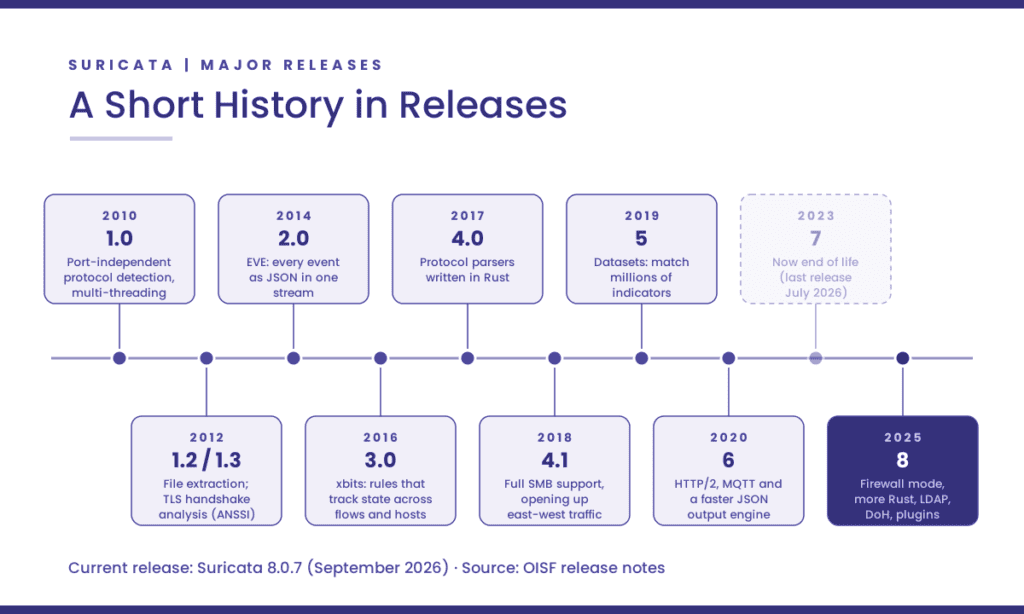
As of this writing the current release is Suricata 8.0.7, from September 2026. Suricata 7, released in 2023, has reached end of life.
Two recent milestones have a Canadian thread. Moving Suricata’s HTTP parser (LibHTP) to Rust, one of the headline changes in version 8, was credited by OISF as a joint effort between Philippe Antoine of the Suricata team and Todd Mortimer of the Canadian Centre for Cyber Security. And SuriCon, the project’s annual conference, came to Montréal in November 2025, the year OISF marked its fifteenth anniversary.
What Suricata actually does
Three jobs, one engine.
Detection (IDS). Suricata compares traffic against rules. A rule describes something to look for and what to do when it’s found. Here’s a simple one:
alert http $HOME_NET any -> $EXTERNAL_NET any (msg:"Example: PowerShell user agent in outbound HTTP"; flow:established,to_server; http.user_agent; content:"PowerShell"; nocase; classtype:policy-violation; sid:1000001; rev:1;)Read left to right: alert on HTTP traffic going from inside the network to outside, on an established connection heading to the server, where the User-Agent header contains “PowerShell”. Notice what the rule doesn’t have to do. It doesn’t say which port HTTP is on, and it doesn’t parse HTTP itself. Suricata has already identified the protocol and split it into fields; the rule just asks for the field it cares about.
Most organizations don’t write most of their rules. Proofpoint’s Emerging Threats team publishes ET Open, a free, BSD-licensed ruleset, and ET Pro, a commercial one. Other publishers, from abuse.ch to Secureworks to Stamus, ship rulesets that plug into Suricata’s own update tool, suricata-update.
Prevention (IPS). Placed inline, Suricata can drop traffic instead of only reporting it. Suricata 8 adds an experimental firewall mode: a default-deny policy in which the ruleset defines what is allowed through, written in the same rule language.
Monitoring (NSM). This is the job newcomers tend to underestimate. Even when no rule fires, Suricata can log every DNS query and answer, every TLS handshake, every HTTP transaction, SMB file operations, flow records, extracted files and full packet capture. All of it comes out in one JSON format, called EVE. That record exists whether or not anything was malicious. Months later, when someone asks whether any host talked to a particular domain in June, the answer is in the records, not in an alert that never fired.
What sets Suricata apart
It identifies protocols by their content, not their port. From its first release, Suricata looked at the opening bytes of each conversation to work out what protocol it was. Malware that ran HTTP to a command-and-control server on an unusual high port was still recognized as HTTP, and still matched HTTP rules. It sounds obvious now. In 2010 it meaningfully raised detection rates.
Rules ask for fields, not bytes. Because Suricata parses protocols itself, a rule can ask directly for a TLS server name, a DNS query, an HTTP user agent or an SMB file name. Rules are simpler to write, easier to read and faster to evaluate.
It is built to scale across cores. Multi-threading was the founding design goal. Suricata spreads work across CPU cores and supports high-performance capture methods including AF_PACKET and DPDK on Linux, with Napatech and PF_RING capture available as plugins. Throughput still depends heavily on the ruleset, the traffic mix and the hardware, so be skeptical of any single performance figure quoted without them.
Alerts and records come out of the same engine, in the same schema. Before EVE, an IDS alert was a terse record of addresses, a payload snippet and a rule ID. Suricata attaches protocol context to each alert and writes it in the same JSON as its protocol logs, so an analyst can pivot from an alert to everything else that host did. It also supports Community ID, a common flow hash that lets you join Suricata records with Zeek logs and other tools that use it. EVE drops into Elastic, Splunk, OpenSearch or almost any SIEM without a custom parser.
It speaks a long list of protocols, including industrial ones. Beyond the web and email protocols you’d expect, Suricata parses SMB, Kerberos, LDAP, RDP, SSH, SNMP, SIP and MQTT, plus the industrial protocols Modbus, DNP3 and EtherNet/IP. It computes client fingerprints such as JA3, JA4 and HASSH. That breadth matters at Canadian utilities and transit agencies, where operational technology (OT) networks are exactly the places a security agent will never be installed.
It is moving to memory-safe code. An engine whose job is to parse hostile input all day is itself an attack surface. Since version 4.0, new protocol parsers have been written in Rust, and version 8 moved more of the core across, including the HTTP parser.
Nobody can close it. Suricata belongs to a non-profit, its code is GPL-licensed, and its detection logic is a published, readable language. A vendor can build on Suricata, but no vendor can take it away. And when a Suricata rule fires, you can read exactly why.
Its rule language has become shared vocabulary. ET Open is written for it. AWS Network Firewall accepts stateful rules in Suricata-compatible syntax and passes them to Suricata for processing. A team that learns to read Suricata rules can carry that skill across products and clouds.
What Suricata is not
Being clear about the limits is what makes the strengths credible.
It is an engine, not a product. Suricata has no console, no case management and no long-term storage. On its own it produces a stream of JSON. Somebody has to collect it, store it, search it, tune the rules and decide what matters. That gap is the reason an entire ecosystem exists around it.
Signatures find what someone has already described. Rules and indicator lists catch known techniques and known infrastructure very well. Spotting new behaviour, such as a host that has never used SMB suddenly touching fifty file shares, takes analysis on top of the records: scripting, statistics, machine learning, or an NDR platform’s own detection layer. This is also the honest answer to the common Suricata vs Zeek question. Zeek is a scriptable network analysis framework built around rich logs and custom logic; Suricata is a signature engine that also produces rich logs. They overlap, and plenty of teams run both. Security Onion and Corelight both do.
It cannot read encrypted payloads. Suricata analyzes TLS handshakes, certificates and client fingerprints rather than decrypting traffic. That metadata is valuable, but it is shrinking at the internet edge: with TLS Encrypted Client Hello, even the server name is disappearing from the wire, as we covered in our post on what network tools can still see under ECH. Internal protocols such as SMB, Kerberos and LDAP, where much of an attacker’s lateral movement happens, remain far more visible.
It needs maintaining. Suricata publishes security releases regularly, and 2026 has seen an unusual volume of them. OISF attributes the record number of vulnerability reports behind its September release to the rise of AI-assisted code analysis. That is a sign of a healthy project under scrutiny, but it means anything built on Suricata needs to track upstream releases closely.
It is only as good as what it sees. Dropped packets, one-sided flows and oversubscribed SPAN ports quietly blind it. We come back to this below, because it is where most deployments go wrong.
The ecosystem: what runs on Suricata today
Because Suricata is an engine, most people meet it inside something else. A cross-section:
| Tool | Type | How it uses Suricata |
|---|---|---|
| Security Onion | Free and open platform | Suricata generates the platform’s network intrusion detection alerts and can also produce protocol metadata and full packet capture |
| Malcolm | Open source, from Idaho National Laboratory with CISA | Combines Suricata alerts with Zeek logs and Arkime packet capture, with an emphasis on industrial control system protocols |
| OPNsense | Open-source firewall | Its intrusion detection and inline prevention system is based on Suricata (pfSense offers Suricata as an add-on package) |
| Assemblyline | Open source, from the Canadian Centre for Cyber Security | The Cyber Centre’s malware triage platform runs Suricata as one of its analysis services, pulling rulesets automatically |
| Clear NDR Community | Open source, from Stamus Networks | A turnkey Suricata-based NDR distribution, formerly known as SELKS |
| AWS Network Firewall | Cloud service | Stateful rule groups are written in Suricata-compatible syntax and processed by Suricata |
| Corelight | Commercial NDR | Runs Suricata alongside Zeek on its sensors, with a shared ID that lets analysts pivot from a Suricata alert into Zeek’s logs |
| Stamus Clear | Commercial NDR | Builds a detection, investigation and evidence layer on top of Suricata (more below) |
| Rulesets | Free and commercial | Proofpoint ET Open and ET Pro, Secureworks, abuse.ch and others publish Suricata rulesets |
Underneath that, a long list of networking and security vendors embed Suricata in their own products, often without naming it on the datasheet. That is part of the point. Suricata has become common infrastructure, in the way Linux is common infrastructure.
A closer look: Stamus Networks
We’ll call out one company here, with the disclosure that Telnet is Stamus’s partner in Canada. Stamus was founded in 2014 by Eric Leblond and Peter Manev, both long-standing members of the Suricata development community. Leblond, Stamus’s CTO, has worked on Suricata since 2009 and sits on the OISF board. That makes Stamus less a company that adopted Suricata than one that grew out of it, and it keeps contributing back: the free Suricata Language Server, which brings rule checking and completion into code editors (version 2.0 arrived in March 2026), Suricata rulesets such as its lateral-movement set, and a free book, Suricata for Analysts.
Its commercial platform, Stamus Clear, takes Suricata’s output and turns it into a short list of high-confidence findings, which Stamus calls Declarations of Compromise, each backed by the evidence and detection logic behind it. It runs on-premises, private cloud or fully air-gapped. We introduced the partnership last month and will look at the platform in more depth in an upcoming post. Here, Stamus is a useful example of a broader pattern: the open engine does the inspection, and the commercial layer does triage, correlation and evidence.
Who deploys Suricata
Suricata’s user base is broad, so it is more useful to describe the types of organization than to list logos.
National cyber security agencies. ANSSI contributed Suricata’s original TLS support and is a consortium member. The Canadian Centre for Cyber Security contributes code and runs Suricata inside Assemblyline. The US Cybersecurity and Infrastructure Security Agency (CISA) lists Suricata among its free cyber security resources and backs Malcolm.
Cloud and service providers. AWS builds a managed firewall service on Suricata, and AWS and Verizon both fund OISF.
Critical infrastructure and OT operators. Malcolm was built with critical infrastructure in mind, including remote hydroelectric facilities, and Suricata’s industrial protocol parsers matter wherever agents can’t be installed. In Canada, this is the population Bill C-8 is about to ask hard questions of.
Enterprise SOCs and managed security providers. Usually through a commercial NDR, an open platform such as Security Onion, or Suricata’s EVE output feeding a SIEM.
Defence and training. Suricata-based tools are a regular presence in cyber defence exercises. Stamus, for example, says it has been an invited NDR partner in NATO’s live-fire exercises for more than ten consecutive years.
Small organizations, labs and classrooms. Through OPNsense, pfSense and Security Onion, Suricata is often the first IDS people learn on, which builds the talent pool everyone else hires from.
Why Suricata is positioned to lead
Predicting which technologies will matter in five years is a good way to look foolish. Still, several trends favour Suricata, and none of them depend on marketing.
The network is the layer attackers can’t avoid. Endpoints get missed, logs get wiped, and edge devices such as VPN gateways and firewalls have become favourite targets precisely because they rarely run security agents. Every intrusion still has to cross the network. An engine that records what crossed it, in an open and structured form, becomes more valuable as other evidence becomes less reliable.
Regulators want evidence you can explain. Canada’s Critical Cyber Systems Protection Act will bring incident-reporting deadlines for designated operators, and reporting means reconstructing what happened. A Suricata detection is a readable rule matched against recorded traffic, so you can show an auditor why it fired. That is a different proposition from a score produced by a model nobody outside the vendor can inspect.
AI-assisted security operations need trustworthy inputs. Every security vendor is adding AI agents that triage and investigate, and those systems are only as good as the telemetry they reason over. EVE is open, structured, documented and vendor-neutral, which is the kind of input that holds up. Stamus, for one, already exposes its Suricata-derived data to AI tools through the Model Context Protocol. The flip side, which we’ll take up in a later post, is that an AI analyst inherits every blind spot in the data underneath it.
It is becoming a platform, not just a program. Suricata 8 can be embedded as a library, extended with plugins for new protocols and capture methods, and run as an experimental firewall. Detection, prevention and policy enforcement expressed in one inspectable language is a convergence worth watching.
Its governance is built to last. A non-profit owner, a funding base drawn from competing vendors, a published roadmap and a steady release rhythm (roughly one major version every two years) are what make an open-source project safe to build a business on. Suricata has all of them.
None of this is guaranteed. Encryption will keep narrowing what any network sensor can see at the edge, and OISF depends on continued industry funding. But the direction of travel suits an open engine that turns traffic into evidence.
Getting it right: Suricata only sees what you feed it
This is the part we work on every day, and the part most explainers leave out. Suricata reconstructs conversations, and to do that well it needs complete, two-sided, accurately timed traffic. A few principles:
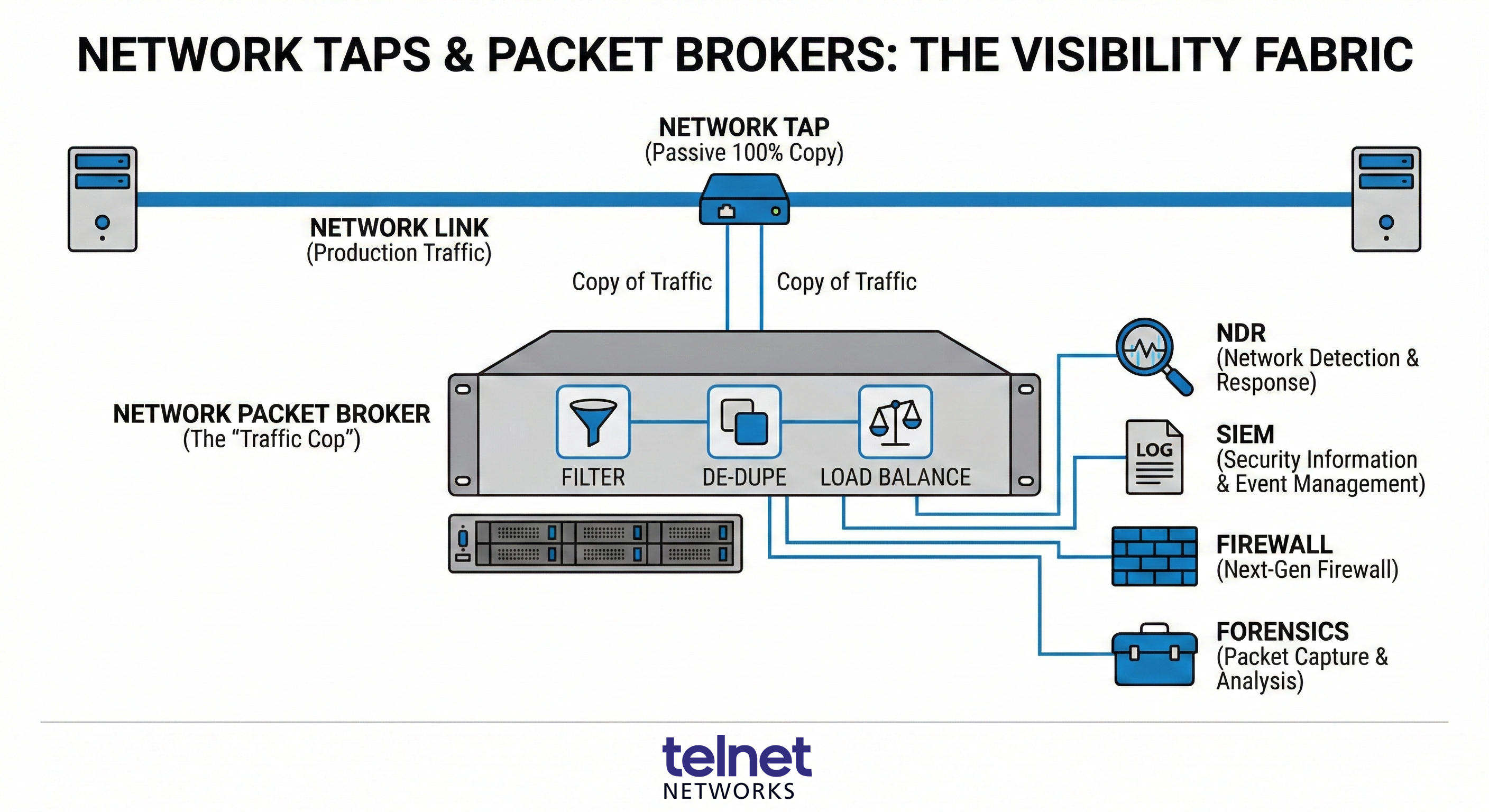
Use TAPs where it matters, not SPAN. Switch mirror ports drop packets under load and can hide errors. For the links that matter, a TAP gives Suricata a complete copy. Our TAPs overview covers the trade-offs.
Keep both directions of every flow together. Suricata tracks each connection’s state and reassembles its streams. If the request and response of one session land on different sensors, or on different worker threads, detection quietly degrades. When a packet broker load-balances traffic across sensors, it has to hash symmetrically so that both directions of a flow arrive at the same place.
Filter before inspection, but don’t slice. A packet broker can strip out traffic that doesn’t need inspecting (backups, storage replication, video) and remove duplicate packets, which lets the same sensor cover far more of the traffic that does. We made the same garbage-in, garbage-out argument years ago, and it still holds. But Suricata needs whole packets, so the packet slicing that suits some performance tools will break its protocol parsing.
Cover east-west, not just the perimeter. Lateral movement happens inside the network, often over SMB, Kerberos and LDAP: exactly the protocols Suricata parses well, and where encryption is less pervasive. A sensor that only watches the internet edge misses most of it.
Watch the drop counters. Suricata reports its own capture and kernel drop statistics. A sensor that drops 5% of packets at peak is a sensor that misses 5% of the evidence exactly when you need it most. Size for peak, not average.
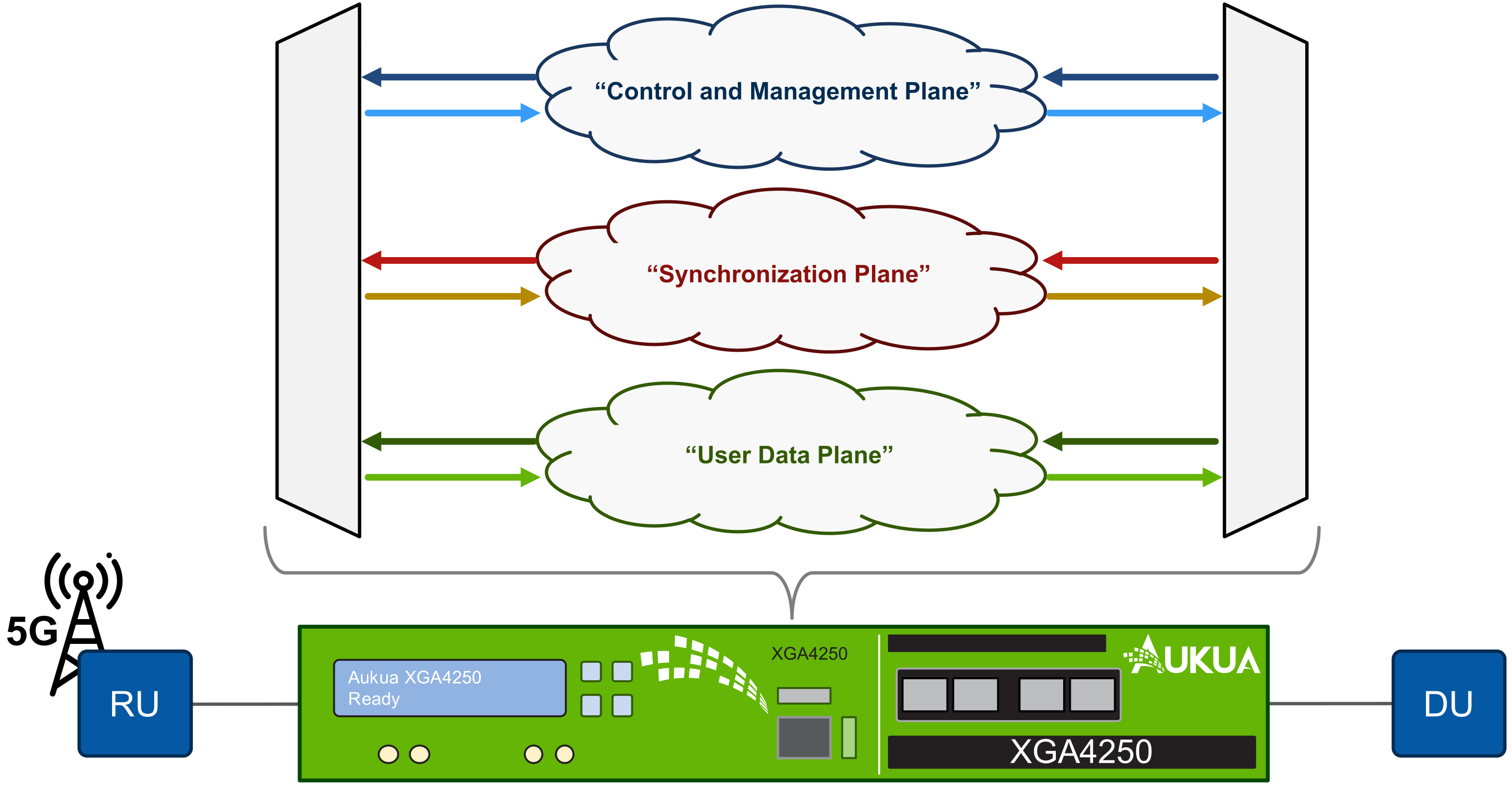
Synchronize the clocks. Every investigation lines Suricata’s records up against firewall, endpoint and identity logs. If the clocks disagree, the timeline falls apart. Our post on precision time and Zero Trust explains why time is a security control in its own right.
Our view is simple: Suricata-based tools and the visibility layer that feeds them shouldn’t be treated as separate decisions. One determines what the other can possibly see.
Five questions to ask any Suricata-based tool
Whether you’re evaluating an open-source platform or a commercial NDR, these questions separate a well-built product from a thin wrapper:
- Which Suricata version does it run, and how quickly do you ship upstream security releases? Suricata 7 is end of life. A product still running it no longer receives engine fixes.
- Can we read, tune and add our own rules? If the detection logic is hidden, you’ve given up the main advantage of building on Suricata.
- Can we get the full EVE data out, into our own SIEM or data lake? Your network records shouldn’t be locked inside one vendor’s console.
- How does it report packet drops, and what happens at peak load? Ask for the sensor’s own drop statistics, not a datasheet throughput figure.
- What does it add beyond the engine? Correlation, triage, evidence retention, integrations. That’s what you’re paying for, so the answer should be specific.
Where to start
If you’re new to Suricata, the fastest way to understand it is to watch it work on real traffic. Run it against a packet capture in a lab, or install one of the free platforms above, enable ET Open, and spend an afternoon reading the EVE records. The official documentation is thorough, and SuriCon 2026 runs November 18 to 20 in Lisbon for anyone who wants to meet the people building it.
And if you’re working out where Suricata-based detection fits in your environment, or how to build the visibility layer that feeds it, talk to our team. We’ll tell you what we see, including where it doesn’t fit.
Telnet Networks is a Canadian value-added reseller of network visibility, network security, test and measurement, and synchronized time solutions. We are Stamus Networks’ partner in Canada, and we also carry the TAPs and packet brokers that feed security sensors. Suricata is a trademark of the Open Information Security Foundation; other product names are trademarks of their respective owners.